Compass Zone Adjustment
Compass Zone Adjustment
NOTE:
This procedure only applies to vehicles without SYNC®.
- 1.
Determine which magnetic zone you are in for your geographic location.
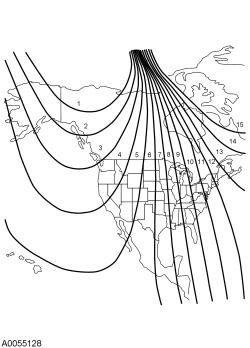 Courtesy of FORD MOTOR COMPANY Courtesy of FORD MOTOR COMPANY
|
- 2.
Access the message center main menu screen. Using the up and down arrow buttons scroll and select the Convenience tab. Press the OK button.
- 3.
Using the up and down arrow buttons scroll and select the Compass tab. Press the OK button.
- 4.
Using the up and down arrow buttons scroll and select the Set Zone tab. Press the OK button.
- 5.
Using the up and down arrow buttons choose the appropriate zone for your location from list of zones available. Press the OK button. A message appears confirming the zone setting. To exit use the left arrow to navigate back to the main menu.