EIM Will Not Switch Between English & Metric
- Place ignition switch in "ACC" position. Depress message center "MILES km" switch. Message center should switch readout from English to Metric or from Metric to English. If okay, go to next step. If not, perform MESSAGE CENTER ENGLISH/METRIC TEST.
- Depress message center "MILES km" switch. The automatic temperature control display should switch from English to Metric or vice versa. If display changes, go to next step. If not, proceed to step 7).
- Remove instrument cluster. Check EIM connector for looseness, bent pins, or other damage. If connector is okay, go to next step. If not, repair connector as required. Repeat step 1).
- With EIM connected, measure voltage at Pin No. 10. With message center in miles mode, voltage should be greater than 3.5 volts. With message center in km mode, voltage should be less than 1.5 volts. If okay, go to next step. If not, go to step 7).
- With EIM connected, ground Pin No. 10. Display should read in Metric mode. If okay, go to next step. If not, replace EIM.
- Disconnect EIM connector. Remove Pin No. 10 from connector and tape. Connect EIM. Display should be in English mode. If okay, repair connector as required. If not, replace EIM.
- Inspect Red wire (Circuit No. 506) between EIM, message center, automatic temperature control, and electronic compass/thermometer for shorts or opens. If okay, system is okay. If not, repair wiring as required.
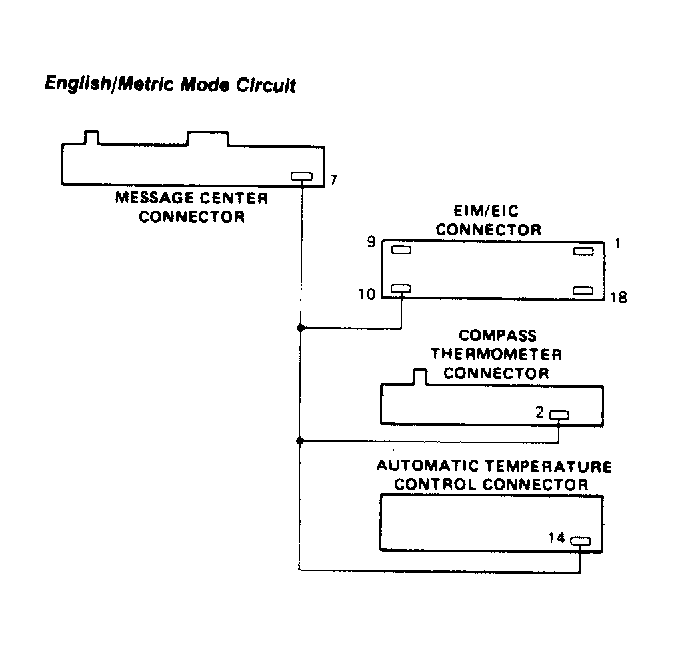 Courtesy of FORD MOTOR CO.