Panel Switches do not Function
NAVIGATION / MULTI INFO DISPLAY: NAVIGATION SYSTEM: Panel Switches do not Function
- Panel Switches do not Function
INSPECTION PROCEDURE
PROCEDURE
1. CHECK PANEL SWITCH
(a) Check for foreign matter around the switches that might prevent operation.
OK:
No foreign matter is found.
NG -- REMOVE ANY FOREIGN MATTER FOUND
OK -- Continue to next step.
2. CHECK PANEL SWITCH
(a) Enter the "Display Check" mode and select "Panel Switch Check" Operation Check.
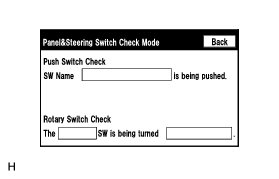
(b) Operate the abnormal switch and check if the switch name and status are correctly displayed.
OK:
The switch name and status are correctly displayed as operated.
NG -- PROCEED TO NEXT SUSPECTED AREA SHOWN IN PROBLEM SYMPTOMS TABLE Problem Symptoms Table
OK -- REPLACE DISPLAY AND NAVIGATION MODULE DISPLAY Removal