DCM Operation History
CELLULAR COMMUNICATION: SAFETY CONNECT SYSTEM: DCM OPERATION HISTORY
1. DCM OPERATION HISTORY
This function shows the telematics network status when the DCM (telematics transceiver) was operated. Use this function when no DTC is stored but the telematics system is unable to connect to the call center. This symptom may occur if the cell phone signal strength is very weak.
(a) Connect the Techstream to the DLC3.
(b) Turn the engine switch on (IG).
(c) Turn the Techstream on.
(d) Choose "Telematics" from the System Selection Menu, and then click "Utility".
(e) Click "DCM Operation History" on the Utility Selection Menu.
(f) Follow the instructions on the Techstream.
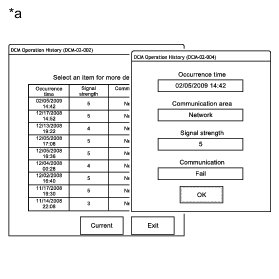
Text in Illustration

HINT
* "Occurrence time" indicates the date of the DCM (telematics transceiver) operation.
* "Communication area" indicates which communication network was used: Network (Verizon) or Roaming.
* "Signal strength" indicates the strength of the cellular signal received by the vehicle: 0 (no signal) to 5 (strong).
* "Communication" indicates connecting to the call center: Success or Fail.

NOTICE:
*: A failure can also be caused by manually ending an SOS call, and does not necessarily indicate a device malfunction.