Removal
PARK ASSIST / MONITORING: CLEARANCE WARNING BUZZER: REMOVAL
1. DISCONNECT CABLE FROM NEGATIVE BATTERY TERMINAL
NOTICE:
* w/ Navigation System:
After the engine switch is turned off, the display and navigation module display (navigation system) records various types of memory and settings. As a result, after turning the engine switch off, be sure to wait for the time specified in the following table before disconnecting the cable from the negative (-) battery terminal.
Waiting Time before Disconnecting Cable from Negative (-) Battery Terminal:

* When disconnecting the cable, some systems need to be initialized after the cable is reconnected Repair Instruction - Initialization.
2. REMOVE INSTRUMENT SIDE PANEL RH Removal
3. REMOVE CENTER INSTRUMENT CLUSTER FINISH PANEL GARNISH Removal
4. REMOVE NO. 2 INSTRUMENT PANEL REGISTER ASSEMBLY Removal
5. REMOVE INSTRUMENT PANEL FINISH PANEL END LH Removal
6. REMOVE INSTRUMENT PANEL FINISH PANEL END RH Removal
7. REMOVE SHIFT LEVER KNOB SUB-ASSEMBLY Removal
8. REMOVE UPPER CONSOLE PANEL SUB-ASSEMBLY Removal
9. REMOVE FRONT UPPER CONSOLE PANEL GARNISH Removal
10. REMOVE NO. 1 INSTRUMENT PANEL FINISH CUSHION Removal
11. REMOVE LOWER INSTRUMENT PANEL FINISH PANEL ASSEMBLY Removal
12. REMOVE RADIO RECEIVER ASSEMBLY
(a) w/o Navigation System:
Remove the radio receiver assembly Removal.
(b) w/ Navigation System:
Remove the radio receiver assembly Removal.
13. REMOVE AIR CONDITIONING CONTROL ASSEMBLY (w/o Navigation System) Removal
14. REMOVE DISPLAY AND NAVIGATION MODULE DISPLAY (w/ Navigation System) Removal
15. REMOVE NO. 1 CLEARANCE WARNING BUZZER
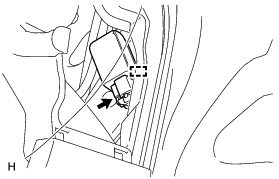
(a) Disconnect the connector.
(b) Detach the clamp and remove the No. 1 clearance warning buzzer.