Instrument Panel Speaker: Removal
- DISCONNECT CABLE FROM NEGATIVE BATTERY TERMINAL
CAUTION:
Wait for 90 seconds after disconnecting the cable to prevent the airbag working. (See
AIRBAG SYSTEM
)
- REMOVE SHIFT LEVER KNOB SUB-ASSEMBLY
(See
REMOVAL
)
- REMOVE CONSOLE PANEL UPPER FRONT
(See
REMOVAL
)
- REMOVE INSTRUMENT PANEL FINISH PANEL LOWER
(See
REMOVAL
)
- REMOVE RADIO RECEIVER
(See REMOVAL
)
- REMOVE MULTI-DISPLAY
(See REMOVAL
)
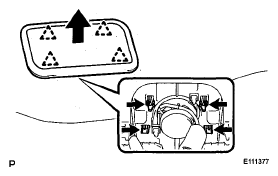
- REMOVE NO. 1 SPEAKER HOLE COVER
- Disengage the 4 clips.
- Remove the No.1 speaker hole cover by pushing it up from the under side of the instrument panel.
 Courtesy of © TOYOTA, LICENSE AGREEMENT TMS1002
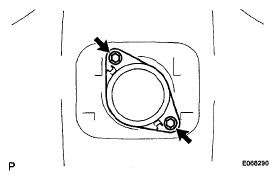
- REMOVE FRONT NO. 2 SPEAKER
- Remove the 2 bolts.
- Disconnect the connector and front No.2 speaker.
 Courtesy of © TOYOTA, LICENSE AGREEMENT TMS1002
- REMOVE FRONT PILLAR GARNISH (for Driver Side)
(See
REMOVAL
)
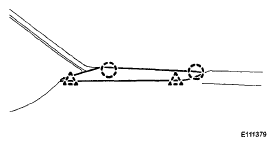
- REMOVE NO. 1 INSTRUMENT PANEL SPEAKER PANEL SUB-ASSEMBLY (for Driver Side)
- Disengage the 2 clips and the 2 claws.
- Remove the No.1 instrument panel speaker subassembly
 Courtesy of © TOYOTA, LICENSE AGREEMENT TMS1002
- REMOVE FRONT NO. 2 SPEAKER (for Driver Side)
- Remove the 2 bolts and the front No.2 speaker.
- Disconnect the connector.