Audio and Visual System
AUDIO / VIDEO: AUDIO AND VISUAL SYSTEM: 63-41: Wrong Disc
DTC 63-41 - Wrong Disc
DTC 63-42 - Disc cannot be Read
DESCRIPTION

INSPECTION PROCEDURE
HINT:
After the inspection is completed, clear the DTCs Reading and Clearing Diagnostic Trouble Codes.
PROCEDURE
1. CHECK DISC
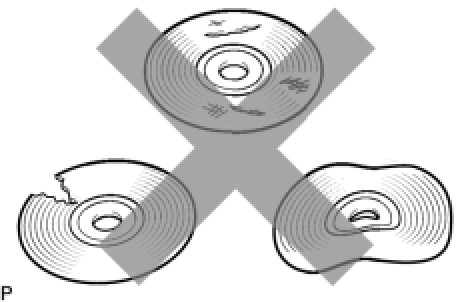
(a) Check that the disc is not deformed or cracked.
OK:
No deformations or cracks on the disc.
NG -- CHANGE DISC
OK -- Continue to next step.
2. DISC CLEANING
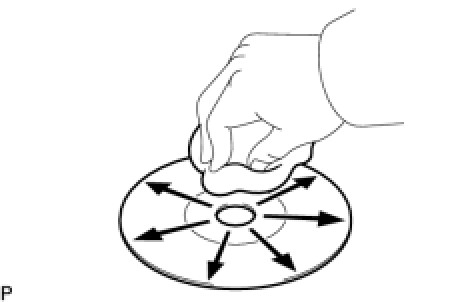
(a) Disc cleaning
(1) If dirt is on the disc surface, wipe it clean with a soft cloth from the inside to the outside in a radial direction.
NOTICE:
Do not use a conventional record cleaner or antistatic preservative.
NEXT -- Continue to next step.
3. CLEAR DTC
(a) Clear the DTCs Reading and Clearing Diagnostic Trouble Codes.
NEXT -- Continue to next step.
4. RECHECK FOR DTC
(a) Recheck for DTCs and check if the same trouble code is output.
OK:
No DTC is output.
NG -- REPLACE DISC WITH ANOTHER AND RECHECK
OK -- END
5. REPLACE DISC WITH ANOTHER AND RECHECK
(a) Replace the disc and recheck.
(1) Replace the disc with a normal one.
(2) Clear the DTCs Reading and Clearing Diagnostic Trouble Codes.
(3) Recheck for DTCs and check if the same trouble code is output.
OK:
No DTC is output.
NG -- REPLACE RADIO RECEIVER ASSEMBLY
OK -- END