Audio and Visual System
AUDIO / VIDEO: AUDIO AND VISUAL SYSTEM: 01-DC: Transmission Error
DTC 01-DC - Transmission Error
DESCRIPTION

NOTICE:
- The multi-display or display and navigation module display is the master unit.
- Be sure to clear and recheck for DTCs after the inspection is completed to confirm that no DTCs are output.
INSPECTION PROCEDURE
NOTICE:
Be sure to read the Description before performing the following procedures.
PROCEDURE
1. CHECK FOR DTC OF OTHER COMPONENTS
(a) Check if the component shown by the sub-code is displayed in the check result of the other components.
(1) Check if "01-DC" is output for the other components.
(2) If "01-DC" is output for any other components, check if the same physical address is displayed.
HINT:
For the list of the components shown by sub-codes, refer to the table in the step below.
Result

B -- IDENTIFY COMPONENT WHICH HAS STORED THIS CODE
A -- Continue to next step.
2. CLEAR DTC
(a) Clear the DTCs Reading and Clearing Diagnostic Trouble Codes.
HINT:
If "01-DC" is output for only one component, this may not indicate a malfunction.
NEXT -- Continue to next step.
3. RECHECK FOR DTC
(a) Recheck for DTCs and check if the same trouble code is output.
OK:
No DTC is output.
Result

C -- CHECK COMPONENT WHICH HAS STORED THIS CODE
B -- CHECK COMPONENT WHICH HAS STORED THIS CODE
A -- USE SIMULATION METHOD TO CHECK
4. IDENTIFY COMPONENT WHICH HAS STORED THIS CODE
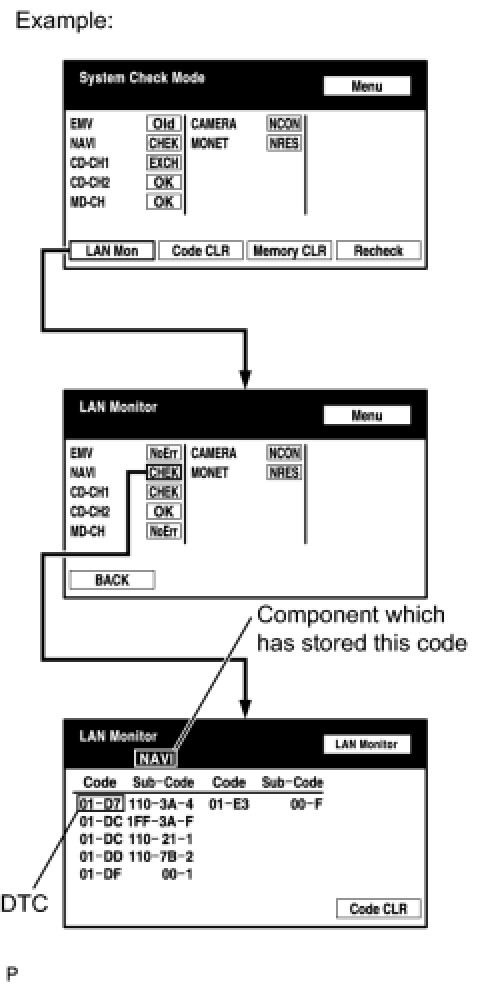
(a) Enter the diagnostic mode.
(b) Press the "LAN Mon" switch to change to "LAN Monitor" mode.
(c) Identify the component which has stored this code.
Component Table
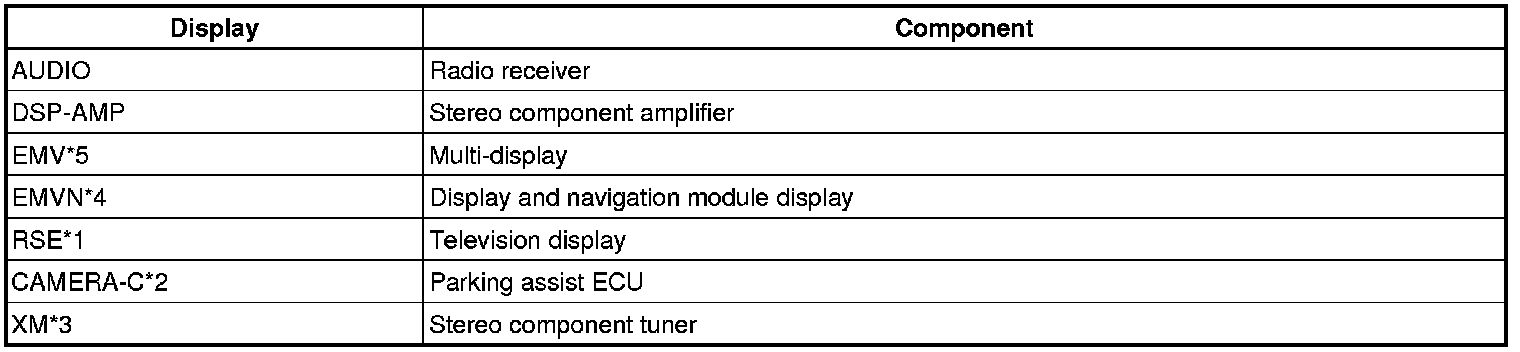
- *1: w/ Rear Seat Entertainment System
- *2: w/ Wide View Front and Side Monitor System
- *3: w/ SDARS System
- *4: w/ Navigation System
- *5: w/o Navigation System
HINT:
"NAVI" is the component which has stored this code in the example shown in the illustration.
NEXT -- Continue to next step.
5. CHECK NAVIGATION SYSTEM
(a) Check if the navigation system is equipped on the vehicle.
Result

B -- CHECK COMPONENT WHICH HAS STORED THIS CODE
A -- Continue to next step.
6. CHECK COMPONENT WHICH HAS STORED THIS CODE
(a) Select the component which has stored this code.
Component Table
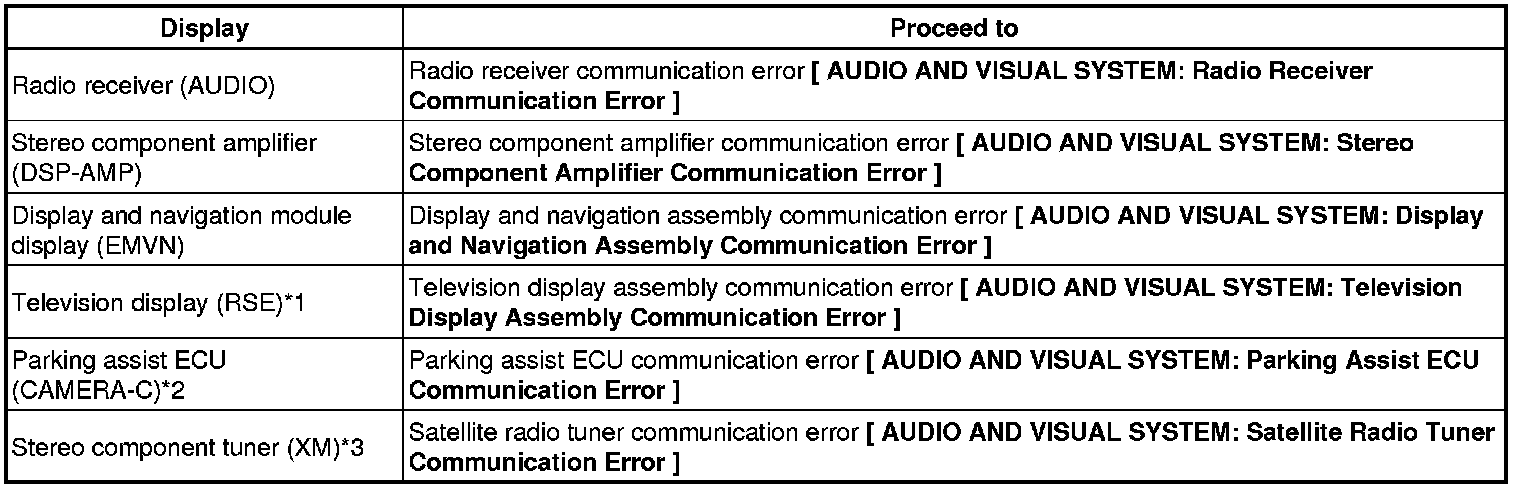
- *1: w/ Rear Seat Entertainment System
- *2: w/ Wide View Front and Side Monitor System
- *3: w/ SDARS System
NEXT -- END
7. CHECK COMPONENT WHICH HAS STORED THIS CODE
(a) Select the component which has stored this code.
Component Table
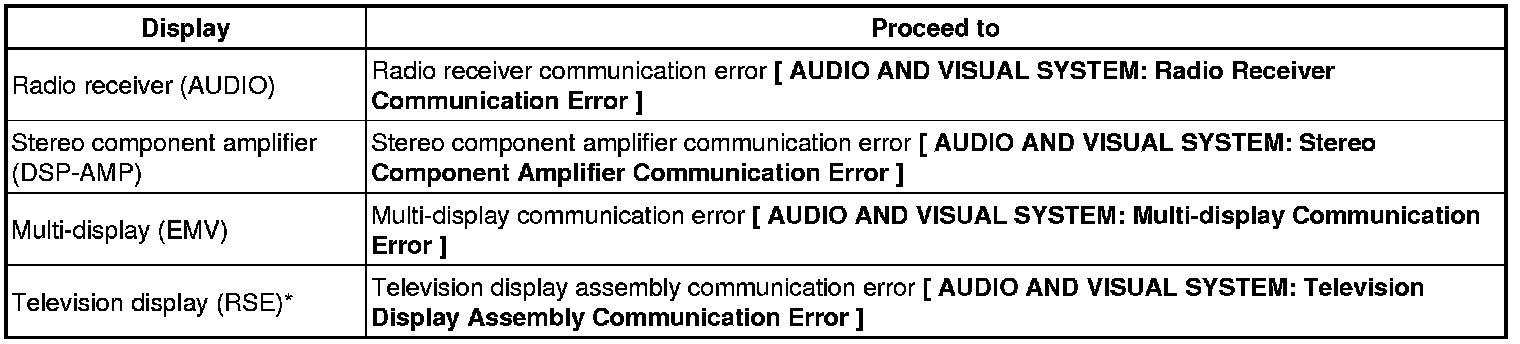
*: w/ Rear Seat Entertainment System
NEXT -- END