Monitor KDS/GDS Data
| Inspection Condition |
Inspection Procedure |
Reference |
- Ignition "ON" and Engine "ON".
- Warm up to normal temperature.
|
- Connect KDS/GDS to Data Link Connector (DLC).
- Monitor parameters in "Current Data" with KDS/GDS
|
Fig 1 to Fig 2TABLE 1. |
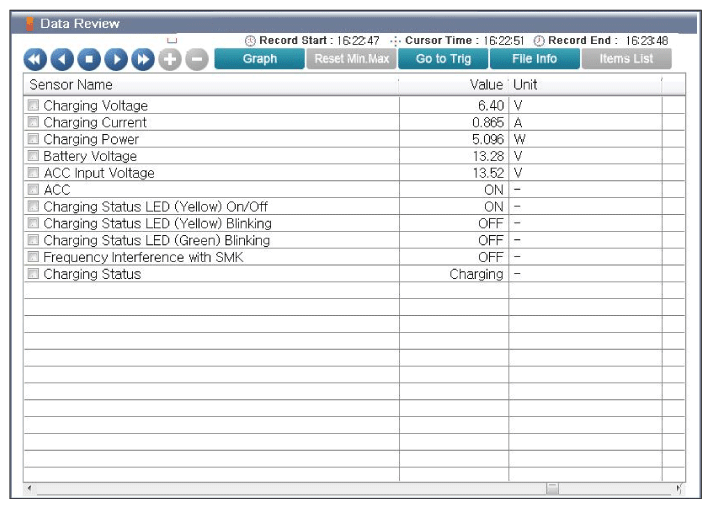 Courtesy of KIA MOTORS AMERICA, INC.
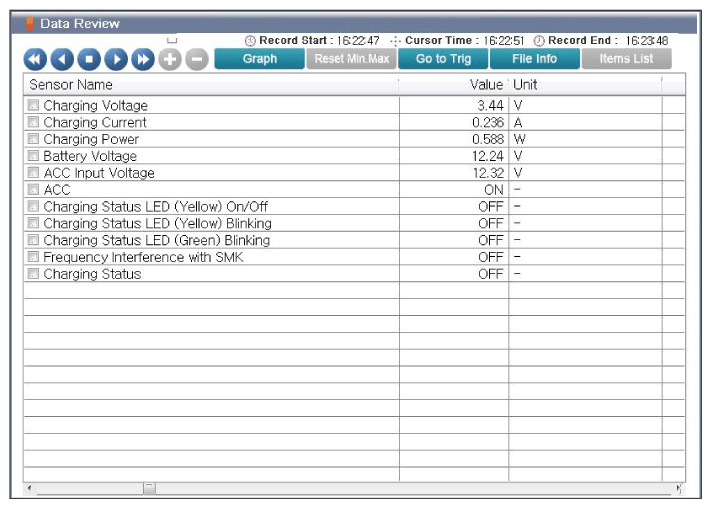 Courtesy of KIA MOTORS AMERICA, INC.
 THRESHOLD VALUE OF CURRENT DATA
| Item |
Threshold Value |
| Charging Voltage |
1 - 12V |
| Charging Current |
0.1 - 4A |
| Charging Power |
1 - 15W |
| Battery Voltage |
9 - 16V |
| ACC Input Voltage |
9 - 16V |
| ACC |
ON: Chargeable/OFF: No charging |
| Charging Status LED (Yellow) On/Off |
ON: Charging/OFF: No charging |
| Charging Status LED (Yellow) Blinking |
ON: Metal material detection or heat generation or position deviation/OFF: Normal |
| Charging Status LED (Green) Blinking |
ON: Charging complete |
| Frequency Interference with SMK ON: |
No charging (Door open or SMK in operation/OFF: Normal (Chargeable) |
| Charging Status |
Charging: Charging normally/OFF: No charging |
| Good |
- Fault might be intermittent and caused either by poor contact in connectors or wiring harness, or it has been repaired and control module memory is not cleared yet. Thoroughly check terminal of battery, all connectors (and connections) for looseness, bending, corrosion, contamination, deterioration, and/or damage.
- Repair or replace as necessary and go to "VERIFICATION OF REPAIR " procedure.
|
| No Good |
|