Instrument Panel - Drivers Side
 Courtesy of CHRYSLER GROUP, LLC
- Disconnect the negative battery cable.
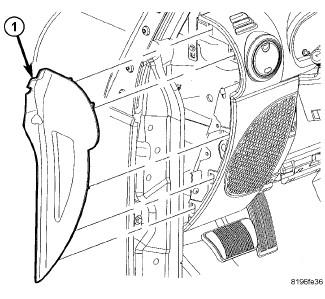
- Remove the instrument panel end cap (1).
 Courtesy of CHRYSLER GROUP, LLC
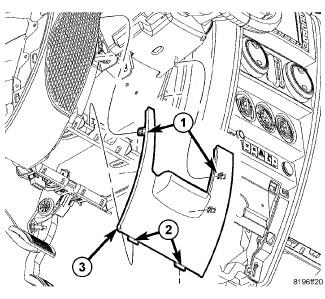
- Remove the steering column opening cover. Refer to COVER, STEERING COLUMN OPENING, REMOVAL
.
 Courtesy of CHRYSLER GROUP, LLC
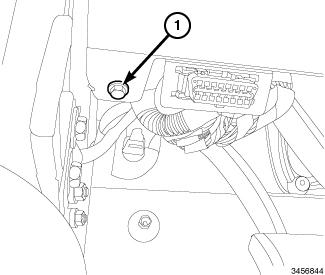
- Remove the driver side lower instrument panel retainer (1) next to the DLC connector.
 Courtesy of CHRYSLER GROUP, LLC
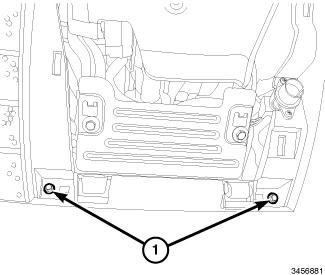
- Remove the instrument panel cover steering column opening cover retainers (1).
 Courtesy of CHRYSLER GROUP, LLC
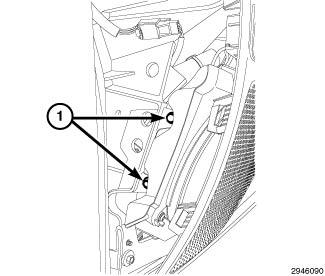
- Remove the speaker mounting fasteners (1).
 Courtesy of CHRYSLER GROUP, LLC
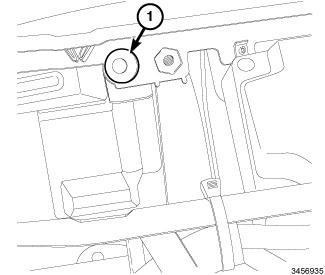
- Remove the driver side lower speaker mounting retainer (1).
- Disconnect the speaker electrical connector.
 Courtesy of CHRYSLER GROUP, LLC
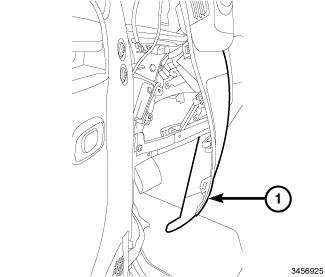
- Remove the speaker by carefully pulling the left side of the instrument panel (1) outward until there is sufficient room to remove the speaker through the end cap area.