Antenna Body And Cable: Domestic
 Courtesy of CHRYSLER LLC
- Disconnect and isolate the battery negative cable.
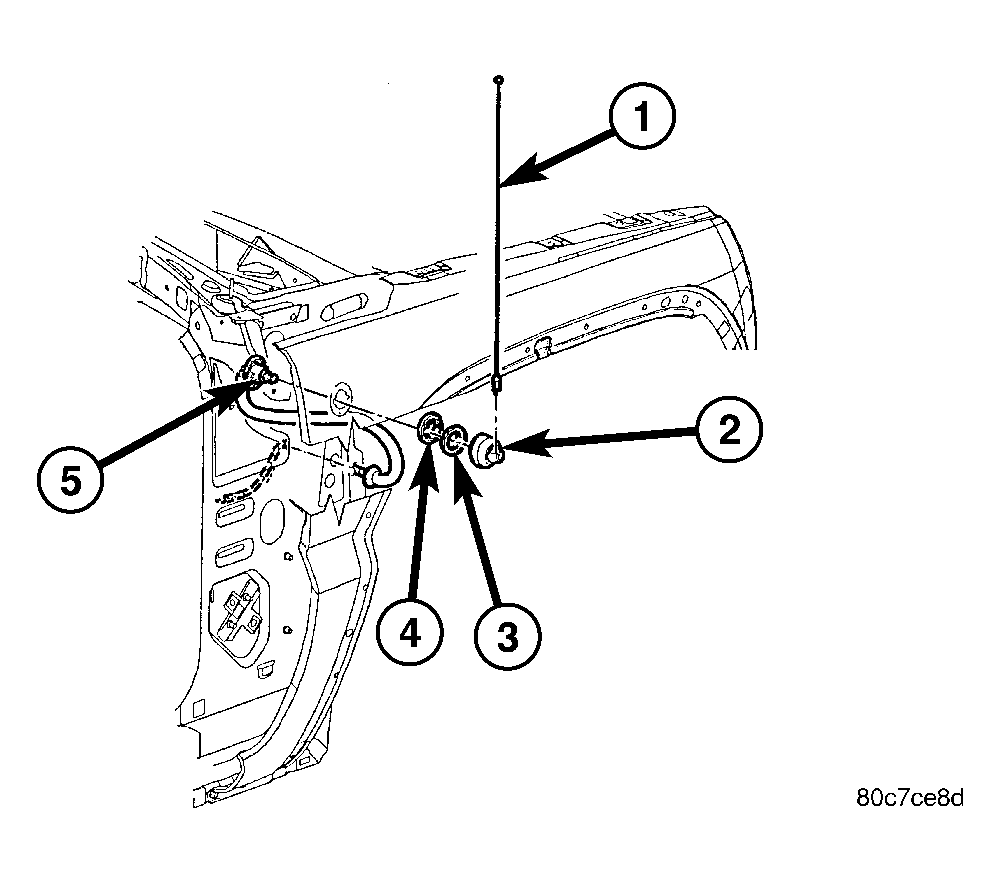
- Remove the antenna mast (1).
- Remove cover (2).
- Remove mounting nut (3).
- Remove bezel adapter.
- Remove right kick panel trim.
- Disconnect antenna body and cable from the instrument panel cable. Attach a wire or string (approximately 2 feet in length) to the cable to aid in installation of the new cable.
- Remove the upper fender mounting bolts. Loosen the two fender mounting bolts located near the upper door hinge. Refer to REMOVAL
.
- Carefully pull fender out to access the antenna body and cable. Pull cable up through the opening with wire attached.