Supplemental Restraints Verification Test
STANDARD PROCEDURE - VERIFICATION TESTThe following procedure should be performed using a DRBIII scan tool to verify proper supplemental restraint system operation following the service or replacement of any supplemental restraint system component.
WARNING: ON VEHICLES EQUIPPED WITH AIRBAGS, DISABLE THE SUPPLEMENTAL RESTRAINT SYSTEM BEFORE ATTEMPTING ANY STEERING WHEEL, STEERING COLUMN, DRIVER AIRBAG, PASSENGER AIRBAG, FRONT IMPACT SENSOR, SIDE IMPACT SENSOR, SIDE CURTAIN AIRBAG, OR INSTRUMENT PANEL COMPONENT DIAGNOSIS OR SERVICE. DISCONNECT AND ISOLATE THE BATTERY NEGATIVE (GROUND) CABLE, THEN WAIT TWO MINUTES FOR THE SYSTEM CAPACITOR TO DISCHARGE BEFORE PERFORMING FURTHER DIAGNOSIS OR SERVICE. THIS IS THE ONLY SURE WAY TO DISABLE THE SUPPLEMENTAL RESTRAINT SYSTEM. FAILURE TO TAKE THE PROPER PRECAUTIONS COULD RESULT IN ACCIDENTAL AIRBAG DEPLOYMENT AND POSSIBLE PERSONAL INJURY.
1. During the following test, the battery negative cable remains disconnected and isolated, as it was during the supplemental restraint system component removal and installation procedures.
Fig. 5 16-Way Data Link Connector - Typical:
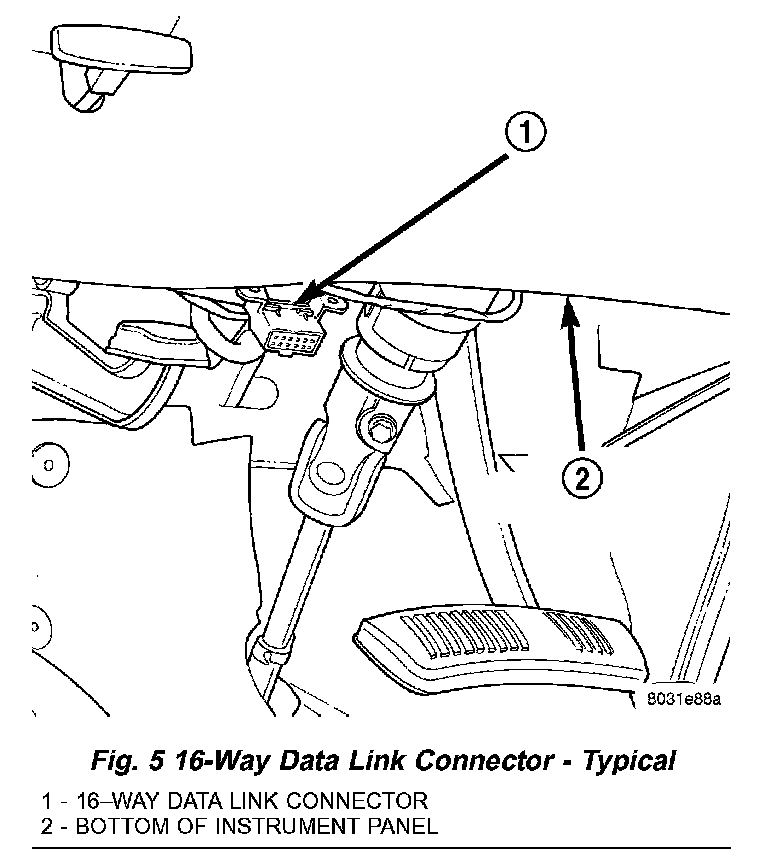
2. Be certain that the DRBIII scan tool contains the latest version of the proper DRBIII software. Connect the DRBIII to the 16-way Data Link Connector (DLC). The DLC is located on the driver side lower edge of the instrument panel, outboard of the steering column.
3. Turn the ignition switch to the On position and exit the vehicle with the DRBIII scan tool.
4. Check to be certain that nobody is in the vehicle, then reconnect the battery negative cable.
5. Using the DRBIII, read and record the active (current) Diagnostic Trouble Code (DTC) data.
6. Next, use the DRBIII to read and record any stored (historical) DTC data.
7. If any DTC is found in Step 5 or Step 6, refer to the appropriate diagnostic information.
8. Use the DRBIII to erase the stored DTC data. If any problems remain, the stored DTC data will not erase. Refer to the appropriate diagnostic information to diagnose any stored DTC that will not erase. If the stored DTC information is successfully erased, go to Step 9.
9. Turn the ignition switch to the Off position for about fifteen seconds, and then back to the On position. Observe the airbag indicator in the instrument cluster. It should light for six to eight seconds, and then go out. This indicates that the supplemental restraint system is functioning normally and that the repairs are complete. If the airbag indicator fails to light, or lights and stays on, there is still an active supplemental restraint system fault or malfunction. Refer to the appropriate diagnostic information to diagnose the problem.