Zone Variation Setting Procedure
- Press and hold the compass switch for 3 - 9 seconds.
- The current zone setting appears on the compass display.
- Find the current geographical location number in Fig 1.
- Select the new zone number. (Press the compass switch until the new zone number appears on the compass display.)
- After select the new zone number, the compass display will automatically shows a direction within a few seconds.
- Perform CALIBRATION PROCEDURE for more accurate indications.
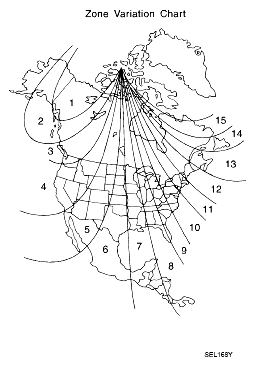 Courtesy of NISSAN MOTOR CO., U.S.A.