Rear Crankshaft Main Bearing Seal: Service and Repair
Crankshaft Rear Oil Seal Replacement
Special Tools
J 41479 Crankshaft Rear Oil Seal Installer
Removal Procedure
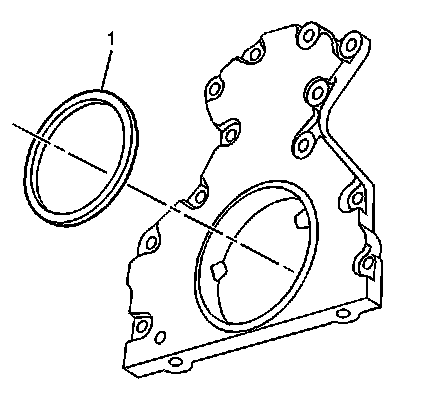
1. Remove the engine flywheel. Refer to Automatic Transmission Flex Plate Replacement (Service and Repair) .
2. Remove the crankshaft rear oil seal (1) from the rear cover.
Installation Procedure
Important:
* The flywheel spacer (if applicable) must be removed prior to oil seal installation.
* Do not lubricate the oil seal inside diameter (ID) or the crankshaft surface.
* Do not reuse the crankshaft rear oil seal.
1. Lubricate the outside diameter (OD) of the oil seal (1) with clean engine oil.
DO NOT allow oil or other lubricants to contact the seal surface.
2. Lubricate the rear cover oil seal bore with clean engine oil.
DO NOT allow oil or other lubricants to contact the crankshaft surface.
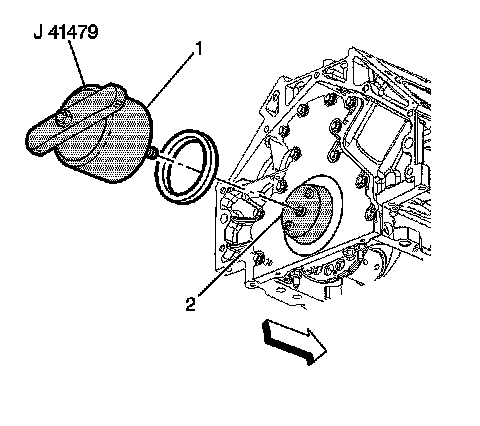
3. Install the J 41479 tapered cone (2) and bolts onto the rear of the crankshaft.
4. Tighten the bolts until snug. Do not overtighten.
5. Install the rear oil seal onto the tapered cone (2) and push the seal to the rear cover bore.
6. Thread the J 41479 threaded rod into the tapered cone until the tool (1) contacts the oil seal.
7. Align the oil seal into the tool (1).
8. Rotate the handle of the tool (1) clockwise until the seal enters the rear cover and bottoms into the cover bore.
9. Remove the J 41479 .
10. Install the engine flywheel. Refer to Automatic Transmission Flex Plate Replacement (Service and Repair) .