Removal Procedure
 Courtesy of GENERAL MOTORS CORP.
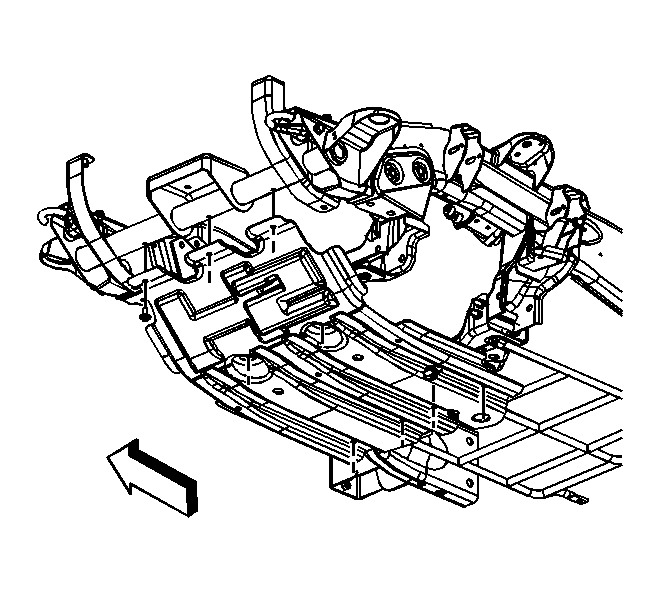
- Raise and suitably support the vehicle. Refer to Lifting and Jacking the Vehicle
.
- Remove the bolts from the engine protection shield.
- Remove the engine protection shield.
 Courtesy of GENERAL MOTORS CORP.
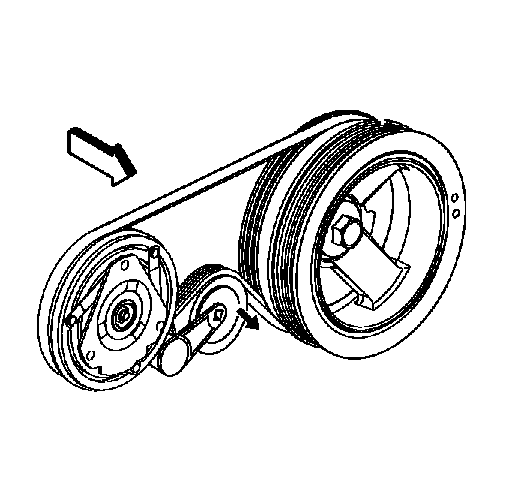
- Install a ratchet into the air conditioning (A/C) belt tensioner adapter opening.
- Rotate the A/C belt tensioner clockwise in order to relieve the tension on the belt.
- Remove the A/C belt from the A/C compressor.
- Slowly release the tension on the A/C belt tensioner.
 Courtesy of GENERAL MOTORS CORP.
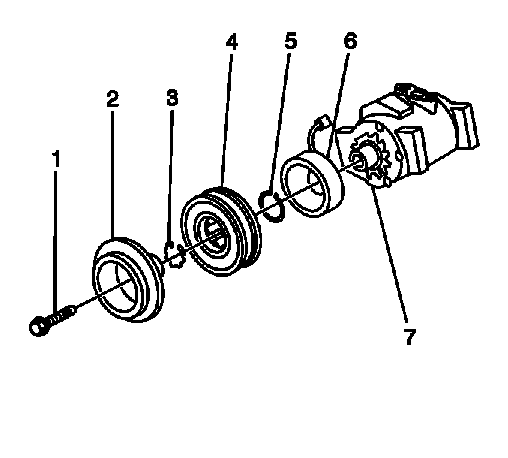
- Remove the clutch plate retaining bolt (1).
- Remove the clutch plate assembly (2).
- Remove the clutch hub/bearing snap ring (3).
- Remove the clutch hub/bearing assembly (4).
- Remove the snap ring (5) from the clutch coil (6).
- Remove the clutch coil (6) from the A/C compressor (7).