USB Adapter Holder/Auxiliary Jack Assembly Replacement
- Remove the center console (see
CENTER CONSOLE REMOVAL/INSTALLATION
).
- Detach the connector (A) from the clip. Remove the cover (B), and disconnect the USB adapter connector (C).
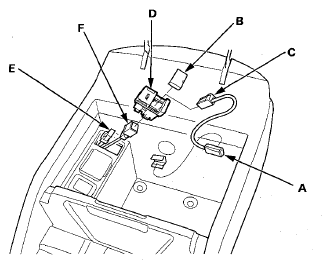 Courtesy of AMERICAN HONDA MOTOR CO., INC.
- Carefully pull out the USB adapter holder/auxiliary jack assembly (D) from the center console box, then disconnect the 5P connector (E) and remove the USB main harness connector (F) from the USB adapter holder/auxiliary jack assembly.
- Install the USB adapter holder/auxiliary jack assembly in the reverse order of removal.