How to Use the HDS (Honda Diagnostic System)
- If the system indicators stay on, connect the HDS to the data link connector (DLC) (A) located under the driver's side of the dashboard.
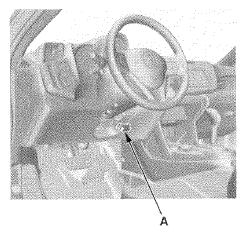 Courtesy of AMERICAN HONDA MOTOR CO., INC.
- Turn the ignition switch to ON (II).
- Make sure the HDS communicates with the vehicle and the EPS control unit. If it does not, go to the DLC circuit troubleshooting (see
DLC CIRCUIT TROUBLESHOOTING
).
- Check the diagnostic trouble code (DTC) for all systems, and note it. Then refer to the indicated DTCS TROUBLESHOOTING , and do the appropriate troubleshooting procedure.
NOTE:
- The HDS reads the DTC, the current data, and other system data.
- For specific operations, refer to the Help menu that came with the HDS.