Pre-Operation Check Set-up
- Make sure all the components of the front passenger's seat are correctly installed.
- Position the front passenger's seat to the rear most position. Adjust the seat-back to the forward most position. Do not move the seat from this position until the operation check is completed.
- Make sure nothing is on the front passenger's seat, including aftermarket seat covers or mats.
- Keep the windows closed.
- Do all initialization procedures, except test-driving, in the service bay.
- Make sure the vehicle is on level ground.
- Turn the heater and the A/C off.
- Do not touch the front passenger's seat during the operation check.
- Do not expose the front passenger's seat to sudden temperature changes.
- Make sure all aftermarket devices such as amplifiers, fluorescent light, air purifiers, CB or HAM radios, etc. are turned off.
- Drive the vehicle, accelerate to 22 mph (36 km/h), then stop on level ground.
- Make sure the ignition switch is in LOCK (0).
- Connect the HDS to the data link connector (DLC) (A).
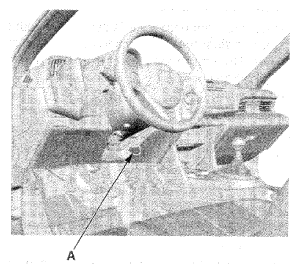 Courtesy of AMERICAN HONDA MOTOR CO., INC.
- Turn the ignition switch to ON (II).
- Make sure the HDS communicates with the vehicle and the SRS unit. If it does not communicate, troubleshoot the DLC circuit (see
DLC CIRCUIT TROUBLESHOOTING
).
- From the HDS Main Menu, select SRS, then Inspection. In the Inspection Menu, select AFTER A VEHICLE COLLISION. Follow the prompts until the front passenger's weight sensor output check has been completed.
- Turn the ignition switch to LOCK (0).
- Disconnect the HDS from the DLC.