No Sound Is Heard From Speaker(s) (Display Is Normal)
No sound is heard from speakers (display is normal)NOTE:
- Set the fader and balance positions to the center.
- Before performing symptom troubleshooting, check for power switch will not turn ON troubleshooting.
1. Check that the volume button is not set to min level.
Is it at MIN level?
YES - Raise the volume level, and recheck the function.
NO -
- With navigation Go to step 2.
- Without navigation Go to step 3.
2. Check the NAVIGATION MUTE MODE.
Is the NAVIGATION MUTE MODE set?
YES - Cancel the NAVIGATION MUTE MODE by depressing the voice command back button, and recheck the function.
NO - Go to step 3.
3. Check to see if there is a specific speaker that has no sound.
Is there a specific one?
YES - Go to step 4.
NO - Go to step 9.
4. Turn the ignition switch OFF.
5. Check the speaker with no sound for any damage.
Is there any damage?
YES - Substitute the speaker and recheck.
NO - Go to step 6.
6. Remove the speaker(s) with no sound, and disconnect its connector.
7. Measure the resistance between the No. 1 and No. 2 terminals of the speaker connector.
Is there about 4 ohm?
YES - Go to step 8.
NO - Faulty speaker(s).
8. Check the speaker 2P connector for a loose or poor connection.
Reconnect the speaker 2P connector and recheck the symptom does it still fail?
YES - Go to step 9.
NO - Operation is normal.
9. Disconnect the audio unit connector A (20P).
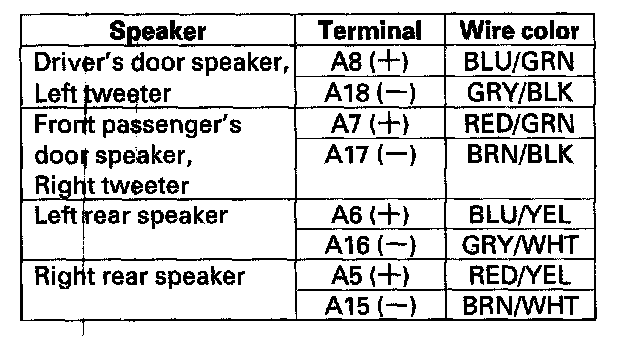
10. Check the resistance between following terminals of audio unit connector A (20P).
Is there more than 4 ohm?
YES - Repair open in the wire between the audio unit and speaker.
NO - Go to step 11
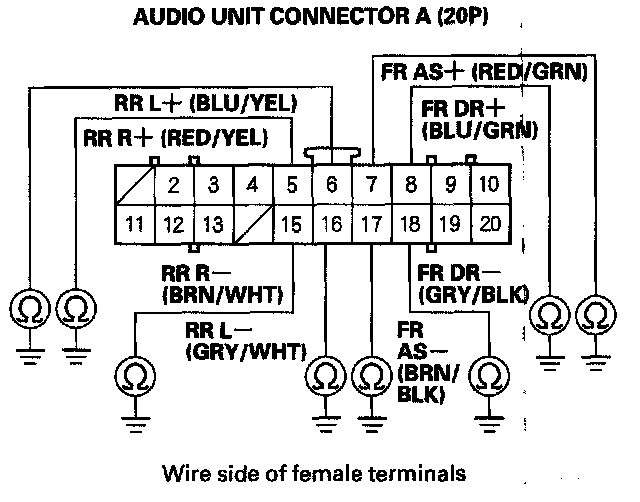
11. Check for continuity between body ground and audio unit connector A (20P) terminals No. 5,6,7, 8,15,16,17 and 18 individually.
Is there continuity?
YES - Go to step 12.
NO - Substitute a known-good audio unit and recheck. If the symptom/indication goes away, replace the original audio unit.
12. Disconnect the speaker that has continuity to ground and recheck.
Is there continuity to ground?
YES - Repair short to ground in the wire between the audio unit and the speaker.
NO - Replace the speaker.