Drive Belt Tensioner: Testing and Inspection
Drive Belt Auto-tensioner Inspection1. Turn the ignition switch ON (II), and make sure to turn the A/C switch OFF. Turn the ignition switch OFF.
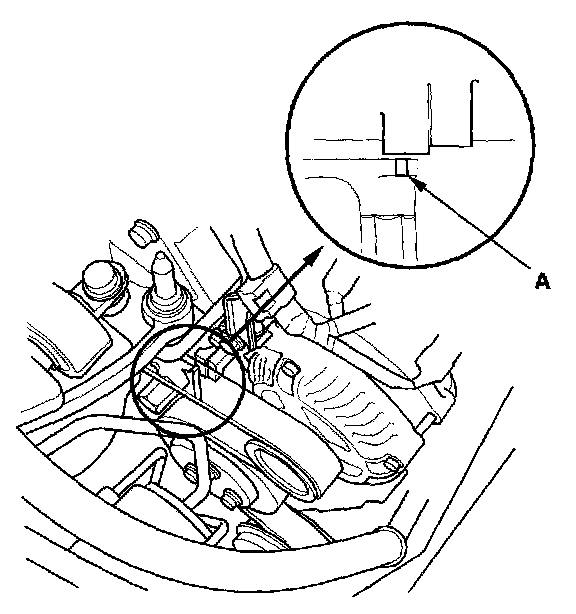
2. Check the position of the auto-tensioner indicator's pointer (A). Start the engine then check the position again with the engine idling. If the position of the indicator moves of fluctuates very much, replace the auto-tensioner.
3. Check for abnormal noise from the tensioner pulley. If you hear abnormal noise, replace the auto-tensioner pulley.
4. Remove the drive belt.
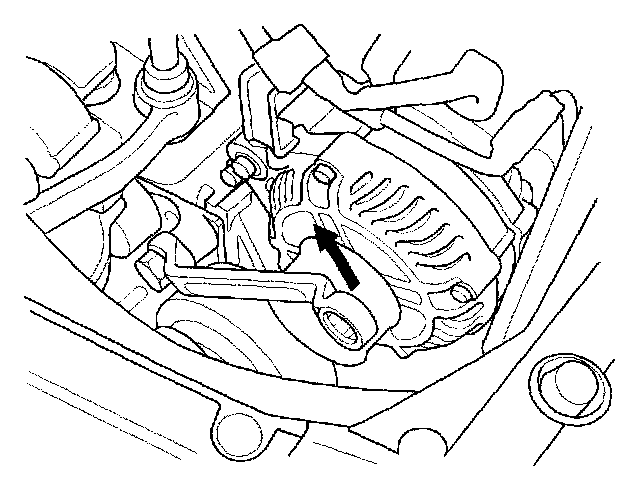
5. Set a long-handled, boxed-end wrench on the drive belt auto-tensioner from above the engine. Slowly turn the wrench in the direction shown. Check that the tensioner moves smoothly and without any abnormal noise. If the tensioner does not move smoothly or you hear abnormal noise, replace the auto-tensioner.
NOTE: This is a hydraulic type auto-tensioner; you must turn the wrench slowly.