Crankshaft Balancer Removal (LF4)
WARNING: This page is about a different car, the 2017 Cadillac ATS. However, it is still accessible from the selected car via links, so may be relevant.
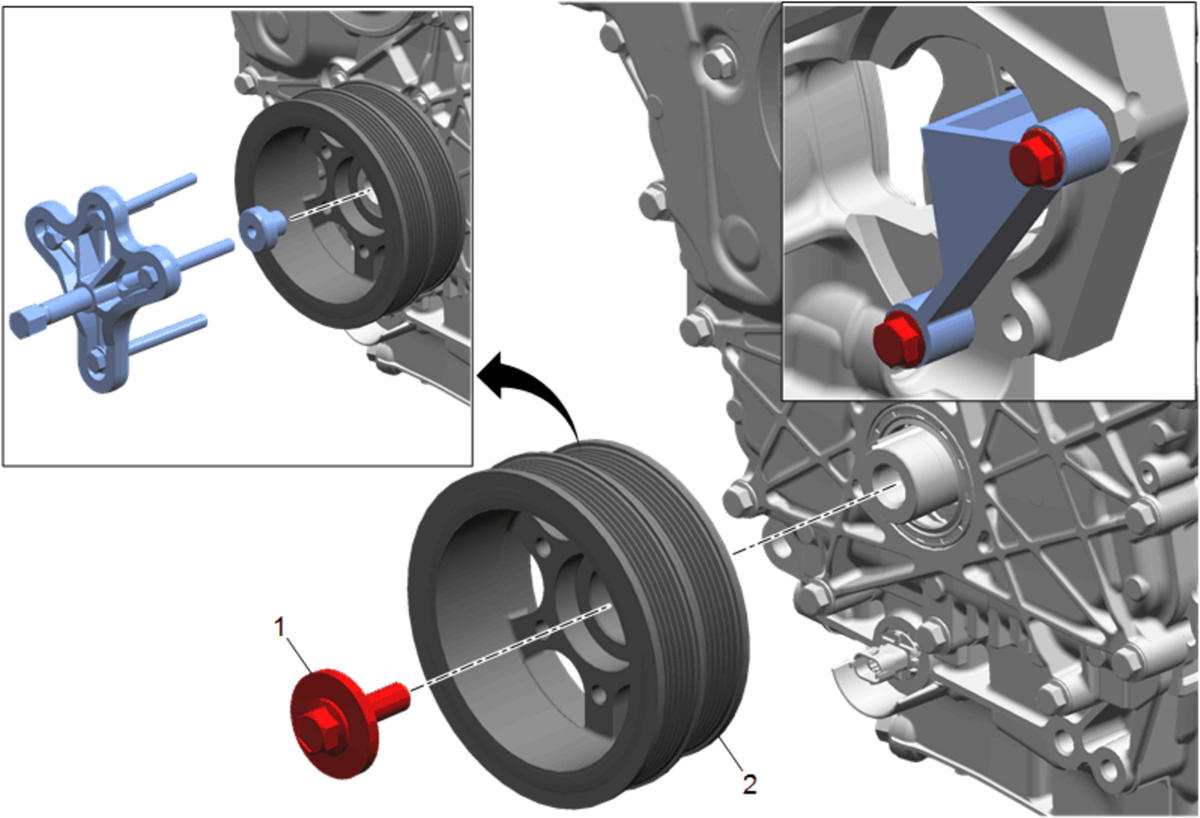 Courtesy of GENERAL MOTORS COMPANY
| Callout |
Component Name |
|
Preliminary Procedures
- Install the EN-46106
Flywheel Holding Tool through the starter mounting hole.
- Remove and discard the crankshaft balancer bolt.
- Install the EN-38416-2
Crankshaft Button in the nose of the crankshaft.
- Install the EN-41816
Crankshaft Balancer Remover in order to remove the crankshaft balancer.
- Tighten the center bolt of the EN-41816
Crankshaft Balancer Remover in order to pull the crankshaft balancer off of the crankshaft.
- Remove the EN-41816
Crankshaft Balancer Remover from the crankshaft balancer.
- Remove the EN-46106
Flywheel Holding Tool through the starter mounting hole.
Special Tools
- EN-38416-2
Crankshaft Button
- EN-41816
Crankshaft Balancer Remover
- EN-46106
Flywheel Holding Tool
For equivalent regional tools, refer to Special Tools (LF4)
. |
| 1 |
Crank Shaft Balancer Bolt
NOTE:
Discard balancer bolt, it will not be reused.
|
| 2 |
Crank Shaft Balancer |