Radio Front Side Door Speaker Replacement
Radio Front Side Door Speaker Replacement
Removal Procedure
1. Remove the front door trim panel. Refer to Front Side Door Trim Panel Replacement (Service and Repair) .
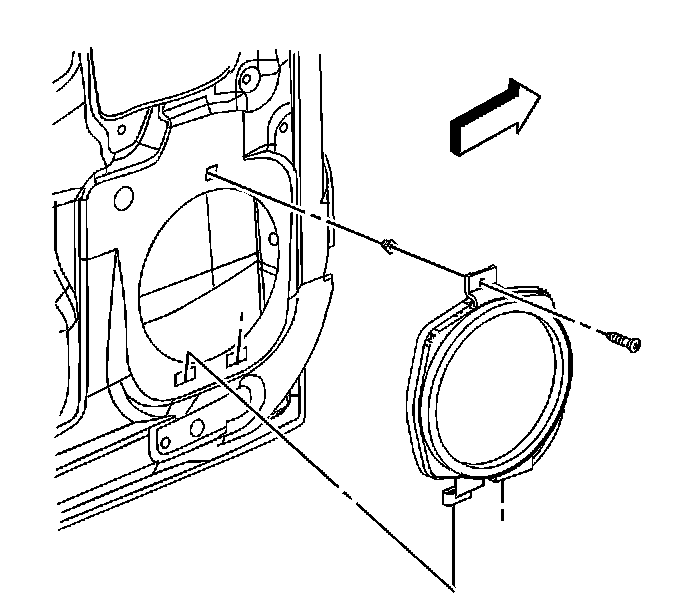
2. Remove the screw securing the speaker to the door.
3. Remove the speaker and the two tabs from the slots in the door.
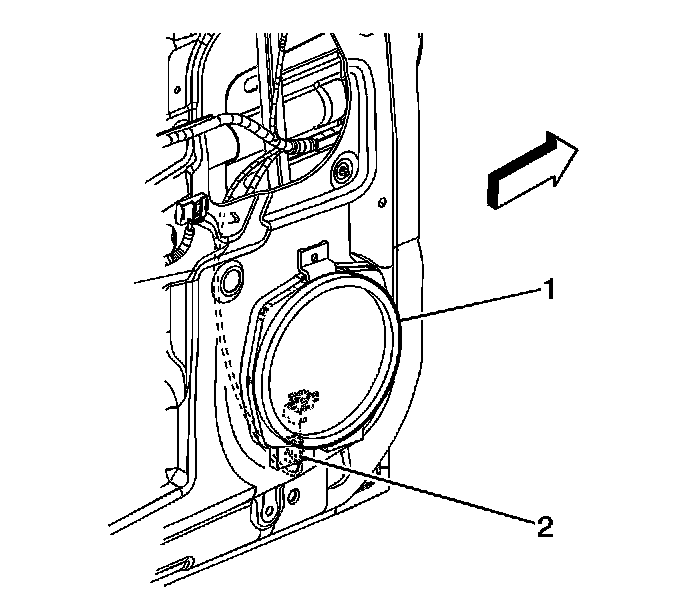
4. Disconnect the speaker electrical connector.
Installation Procedure
1. Connect the speaker electrical connection.
2. Install the two tabs on the speaker into the slots in the door.
Notice: Refer to Fastener Notice.
3. Install the screw securing the speaker to the door.
Tighten the front door speaker screw to 2.5 N.m (22 lb in).
4. Install the front door trim panel. Refer to Front Side Door Trim Panel Replacement (Service and Repair) .