Removal And Installation
WARNING: This page is about a different car, the 2016 Ford Expedition. However, it is still accessible from the selected car via links, so may be relevant.
Front AM/FM antenna cable
- 1.
Remove the Audio Front Control Module(ACM). For additional information, refer to Audio Control Module (ACM) .
Rear AM/FM antenna cable
- 2.
Remove the RH scuff plate.
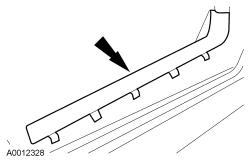 Courtesy of FORD MOTOR COMPANY Courtesy of FORD MOTOR COMPANY
|
- 3.
Remove the RH A-pillar lower trim panel.
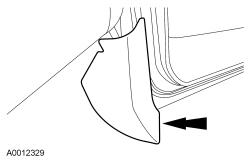 Courtesy of FORD MOTOR COMPANY Courtesy of FORD MOTOR COMPANY
|
Both AM/FM antenna cables
- 4.
Disconnect the AM/FM antenna cable connection.
- 5.
NOTE:
The rear AM/FM antenna cable is an integral part of the wiring harness and cannot be replaced separately from the harness. Cut the ends off the old antenna cable and tape the remainder to the wiring harness to prevent noise.
Remove the AM/FM antenna cable.
- 6.
NOTE:
When installing a new rear AM/FM antenna cable, tape or wire-tie the new cable to the wiring harness to prevent noise.
To install, reverse the removal procedure.