Manual Bleeding
- Connect the diagnostic tool Data Communication Link (DCL) cable adapter into the vehicle Data Link Connector (DLC) under the dash and follow the diagnostic tool instructions.
- Clean all dirt from and remove the brake master cylinder filler cap. Fill the brake master cylinder reservoir with the specified brake fluid.
- Bleed the brake system in the order displayed on the diagnostic tool. Attach a rubber drain tube to the bleeder screw and submerge the free end of the tube in a container partially filled with clean brake fluid.
- Have an assistant hold firm pressure on the brake pedal.
- Loosen the bleeder screw until a stream of brake fluid comes out. While the assistant maintains pressure on the brake pedal, tighten the bleeder screw.
- If pedal is not firm, repeat bleeding procedure. Repeat until clear, bubble-free fluid comes out. Refill the brake master cylinder reservoir as necessary.
- Tighten the bleeder screw.
- Repeat procedure for the remaining bleeder screws in the system in the order displayed on the diagnostic tool. See Fig 1. See BLEEDING SEQUENCE . When bleeding is complete, fill master cylinder to proper level.
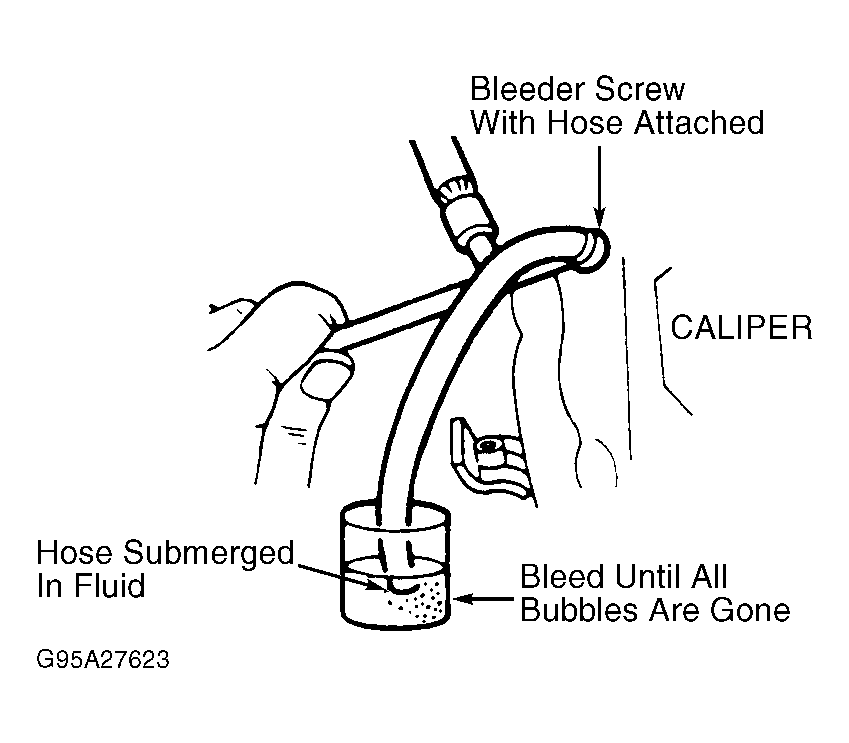 Courtesy of FORD MOTOR CO.