Antenna Cable: Service and Repair
REMOVAL1. Remove the antenna base.
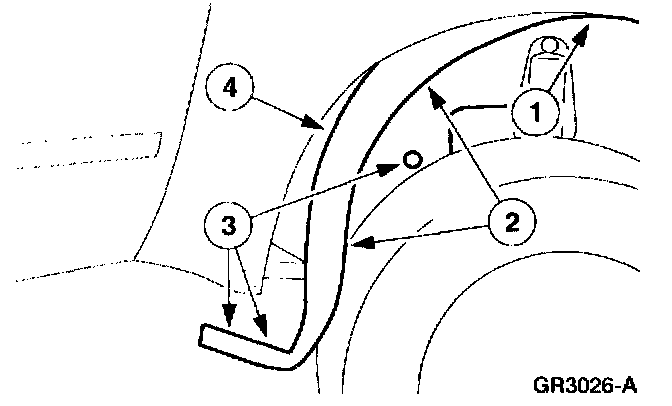
2. Position the RH front fender splash shield away from the bulkhead.
1 Remove the two nuts.
2 Remove the screws.
3 Remove the pin-type retainers.
4 Position the RH front fender splash shield away from the bulkhead.
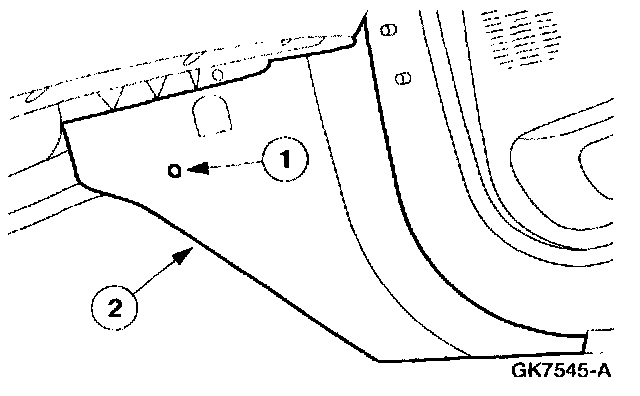
3. Remove the RH cowl side trim panel.
1 Remove the pin-type retainers.
2 Remove the RH cowl side trim panel.
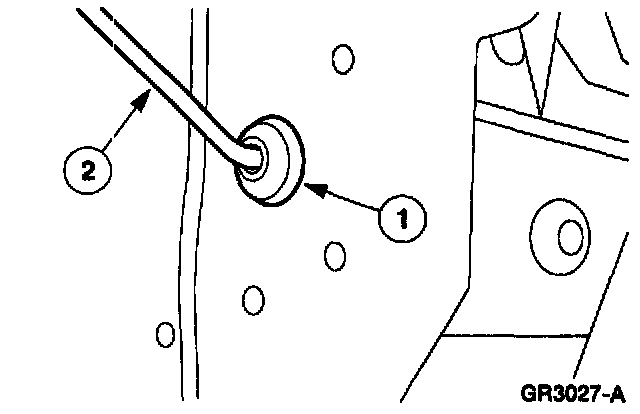
4. Route the new radio antenna lead-in cable into the passenger compartment.
1 Unseat the old radio antenna lead-in cable grommet from the bulkhead.
2 Route the new radio antenna lead-in cable into the passenger compartment.
5. Remove the radio chassis.
6. Remove the old radio antenna lead-in cable connectors to avoid rattles or identification problems.
NOTE: This vehicle uses a radio antenna lead-in cable that is attached to the instrument panel reinforcement and the defroster air duct. Do not remove the old radio antenna lead-in cable from the vehicle.
INSTALLATION
1. To install, reverse the removal procedure.
NOTE: Secure the new radio antenna lead-in cable to the instrument panel reinforcement.