Test Ah: No Communication With RCM
- Check connections for damage
Turn ignition off. Disable air bag system. See DISABLING SYSTEM
under DISABLING & ACTIVATING AIR BAG SYSTEM. Access RCM and disconnect harness connector C310A. See RESTRAINTS CONTROL MODULE
under REMOVAL & INSTALLATION. Inspect RCM pins (component side) and harness connector C310A, terminal No. 4 (Light Blue/White wire) for damage. See Figure
. If module pins and harness connector C310A, terminal No. 4 are okay, go to next step. If module pins and/or harness connector C310A, terminal No. 4 are damaged, repair/replace as necessary. Reconnect system. Retest communication to RCM.
- Check DLC for damage
Inspect Data Link Connector (DLC) and DLC connector terminal No. 7 (Light Blue/White wire) for damage. DLC is located under right side of instrument panel. See Fig 1
. If DLC connector and DLC connector terminal No. 7 (Light Blue/White wire) are okay, go to next step. If DLC connector and/or DLC connector terminal No. 7 (Light Blue/White wire) is damaged, repair/replace as necessary. Activate air bag system. See ACTIVATING SYSTEM
under DISABLING & ACTIVATING AIR BAG SYSTEM.
- Check circuit 70 for open
Measure resistance of Light Blue/White wire between DLC connector terminal No. 7 and RCM harness connector C310A, terminal No. 4. If resistance is less than 5 ohms, replace RCM. Activate air bag system. See ACTIVATING SYSTEM
under DISABLING & ACTIVATING AIR BAG SYSTEM. Retest communication with RCM. If resistance is more than 5 ohms, repair open in Light Blue/White wire. Activate air bag system. See ACTIVATING SYSTEM
under DISABLING & ACTIVATING AIR BAG SYSTEM. Retest communication with RCM.
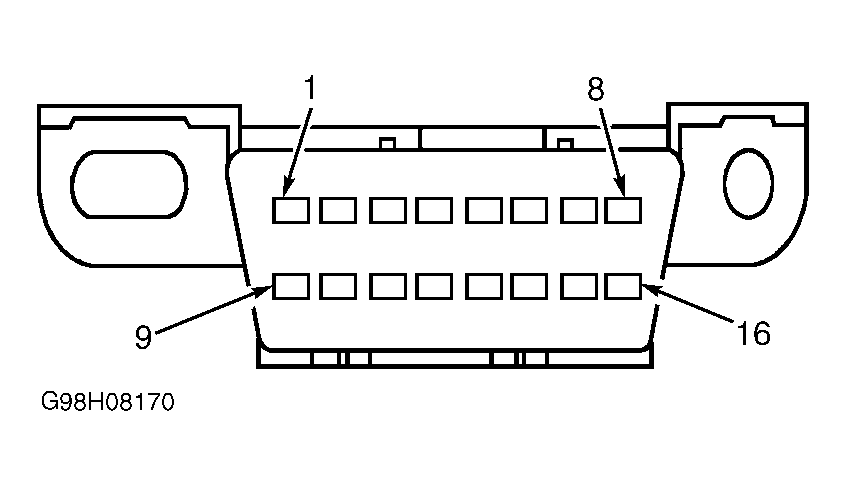 Courtesy of FORD MOTOR CO.