Charge Indicator Light
- The generator regulator has a circuit that indicates a high or low system voltage condition. The charge indicator light will come on if the generator is not charging or is overcharging. If either of these conditions exists, see GENERATOR article in the ELECTRICAL Section.
- Turn ignition on. If charge indicator light does not come on, ensure wiring is not open and indicator bulb is okay. See Figure
or Figure
.
- If indicator light still does not come on, unplug connector from regulator. Connect jumper wire from harness connector "I" terminal to negative battery cable. See Fig 1
. Turn ignition on. If indicator light does not come on, perform voltage regulator "I" circuit tests. See GENERATOR article in the ELECTRICAL Section.
- If indicator light comes on when jumper is connected between "I" terminal and negative battery cable, remove jumper wire and reattach regulator connector.
- Connect DVOM negative lead to negative battery post. Connect positive lead to voltage regulator terminal "A" screw at generator. Battery voltage should exist.
- If battery voltage does not exist, repair circuit "A" wiring. If battery voltage exists, clean and tighten ground connections at generator and regulator. Turn ignition on. If indicator light still does not come on, replace regulator.
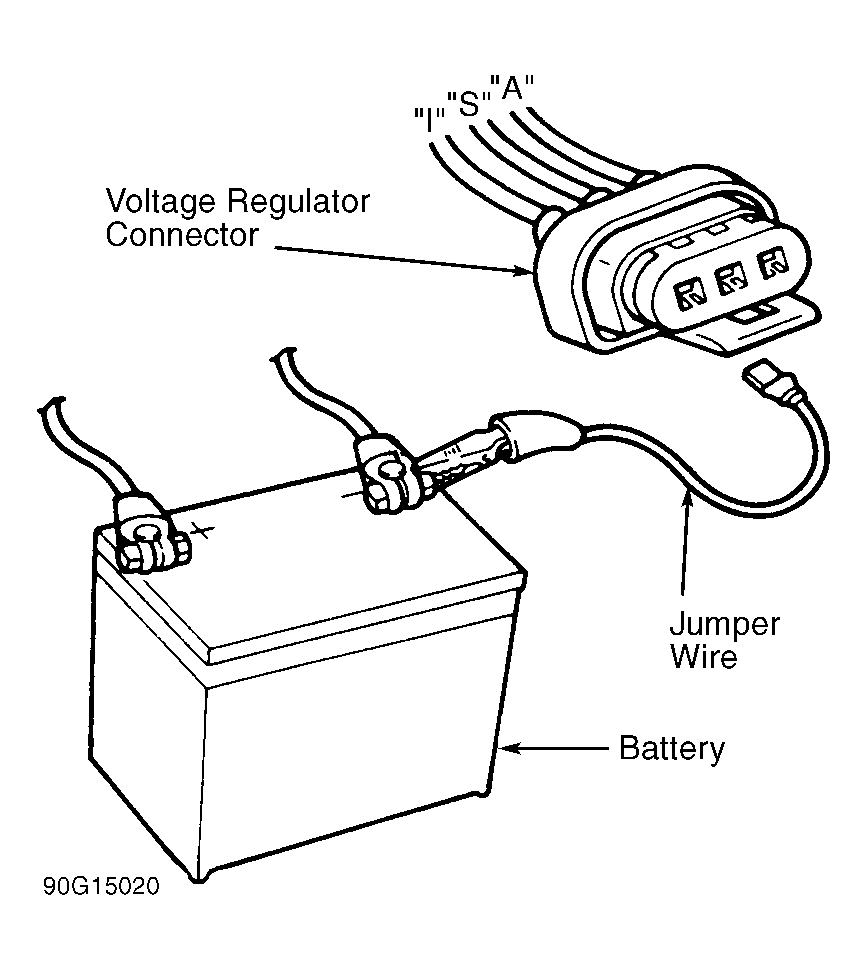 Courtesy of FORD MOTOR CO.