B1B92
B1B92-PASSENGER SEAT TRACK POSITION SENSOR CIRCUIT PERFORMANCE
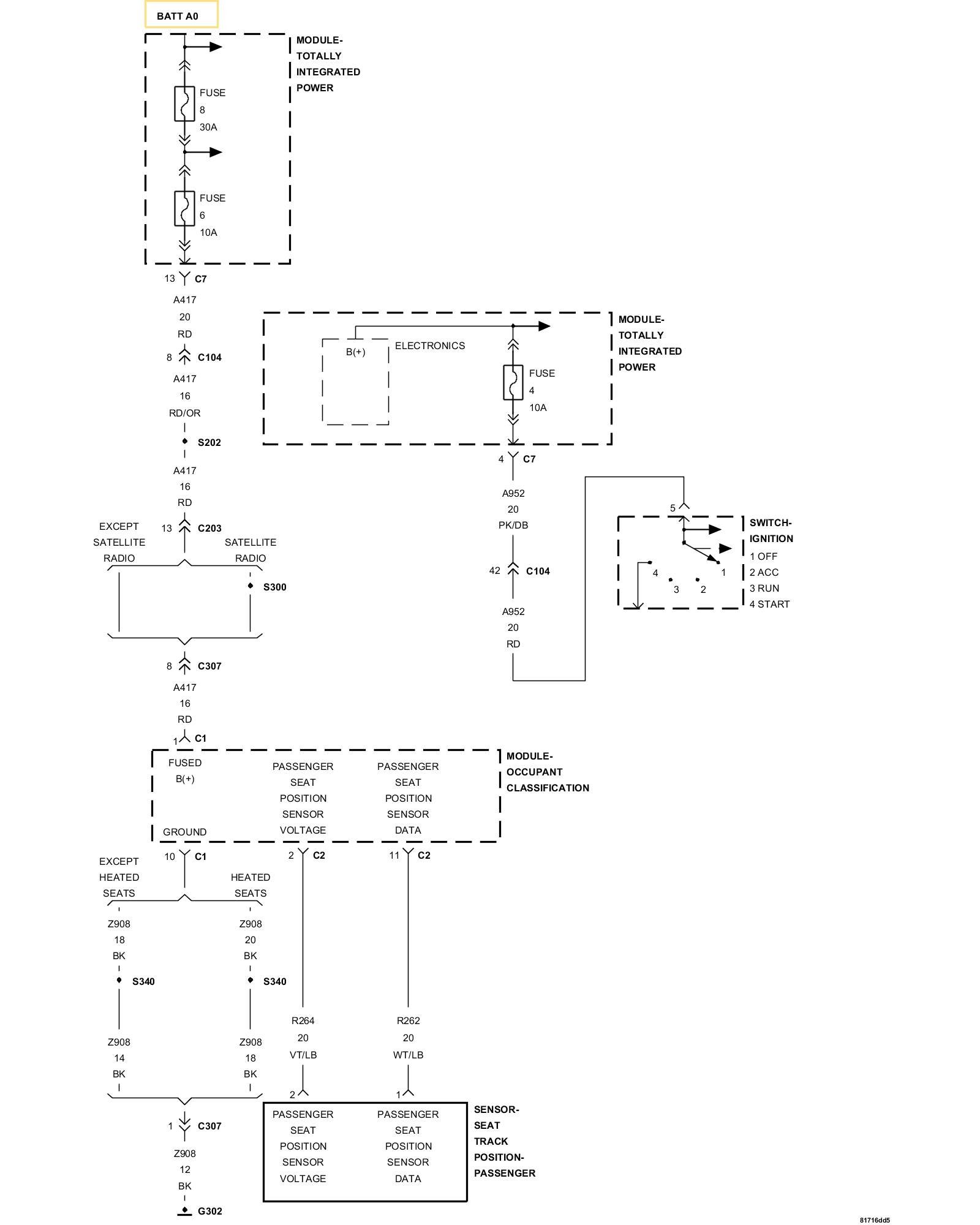
For a complete wiring diagram refer to the Wiring Information Electrical Diagrams.
- When Monitored:
While the CAN bus ignition status is in IGN_RUN, the module checks the sensor input ranges.
- Set Condition:
If the module detects that the sensor input is between 8 and 12 mA.

1. CHECK FOR ACTIVE INTERNAL FAULTS, IGNITION FAULTS, BATTERY FAULTS, AND SEAT TRACK POSITION SENSOR CIRCUIT HIGH OR LOW FAULTS IN THE OCCUPANT CLASSIFICATION MODULE (OCM)
NOTE: Ensure the battery is fully charged.
1. Turn the ignition on.
2. With the scan tool, read Occupant Classification Module (OCM) DTCs.
Does the scan tool display any active DTCs relating to internal faults, ignition faults, battery faults, or Seat Track Position Sensor Circuit High or Low faults?
Yes
- Diagnose and repair the DTCs. Testing and Inspection.
No
- Go To 2
2. VERIFY THAT B1B92-PASSENGER SEAT TRACK POSITION SENSOR CIRCUIT PERFORMANCE IS ACTIVE
1. With the scan tool, read OCM DTCs.
Does the scan tool display active: B1B92-PASSENGER SEAT TRACK POSITION SENSOR CIRCUIT PERFORMANCE?
Yes
- Go To 3
No
- Go To 4
3. PERFORM SEAT TRACK POSITION SENSOR PERFORMANCE TEST
1. Turn the ignition off, wait 10 seconds and then turn the ignition on.
2. Cycle the passenger seat to the full forward position and then to the full rearward position.
3. Return the passenger seat to its approximate original position.
4. Wait two minutes, and then with the scan tool, read OCM DTCs.
Does the scan tool display active: B1B92-PASSENGER SEAT TRACK POSITION SENSOR CIRCUIT PERFORMANCE?
Yes
- Replace the Passenger Seat Track Position Sensor.
- Perform the OCS VERIFICATION TEST.OCS Verification Test. If DTC B1B92-PASSENGER SEAT TRACK POSITION SENSOR CIRCUIT PERFORMANCE returns active, replace the OCM. .Occupant Classification Module (OCM) System Verification Test
No
- Perform the OCS VERIFICATION TEST. OCS Verification Test.
4. TEST FOR AN INTERMITTENT CONDITION
1. With the scan tool, record and erase all DTCs from the OCM.
2. If any ACTIVE codes are present they must be resolved before diagnosing any stored codes.
WARNING: Turn the ignition off, disconnect the 12-volt battery and wait two minutes before proceeding. Failure to follow these instructions may result in possible serious or fatal injury.
3. Using the wiring diagram/schematic as a guide, inspect the wiring and connectors.
4. Look for chafed, pierced, pinched, or partially broken wires and broken, bent, pushed out, spread, corroded, or contaminated terminals.
5. The following additional checks may assist you in identifying a possible intermittent problem.
6. Reconnect any disconnected components and harness connector.
WARNING: Turn the ignition on, then reconnect the 12-volt battery. Wait two minutes before proceeding. Failure to follow these instructions may result in possible serious or fatal injury.
7. With the scan tool monitor active codes as you work through the following steps.
WARNING: Maintain a safe distance from all airbags while performing the following steps. Failure to follow these instructions may result in possible serious or fatal injury.
8. Wiggle the wiring harness and connectors of the related airbag circuit or component.
9. If only stored codes return continue the test until the problem area has been isolated.
10. In the previous steps you have attempted to recreate the conditions responsible for setting active DTC in question.
Are any ACTIVE DTCs present?
Yes
- Select the appropriate diagnostic procedure. Testing and Inspection.
No
- No problem found at this time. Erase all codes before returning vehicle to customer.