Parking Brake Lever: Removal
- Unclip the air cleaner cover (2 clips) and move the cover aside.
- Disconnect and isolate the negative battery cable.
- Block the tires and wheels so the vehicle does not move once the vehicle parking brake lever is released.
- Remove the transmission shift knob as necessary.
- Place the parking brake lever in released (full OFF) position.
- Remove screws attaching center console.
- Remove rear switch panel from center console.
- Working through switch opening, grasp a parking brake cable to equalizer and pull back approximately 1" (25.4 mm).
- While holding the cable or equalizer, pull the parking brake handle to it's full upright position
- Remove the center console.
- Lock out parking brake cables. See CABLE TENSIONER
under ADJUSTMENTS.
- Remove both rear parking brake cable from the parking brake cable equalizer. See Figure
.
- Remove the wiring harness electrical connector from the parking brake warning switch on the right side of the parking brake lever.
- Remove the screw and the nut attaching the parking brake lever to the vehicle. See Fig 1
.
- Remove the parking brake lever from the vehicle.
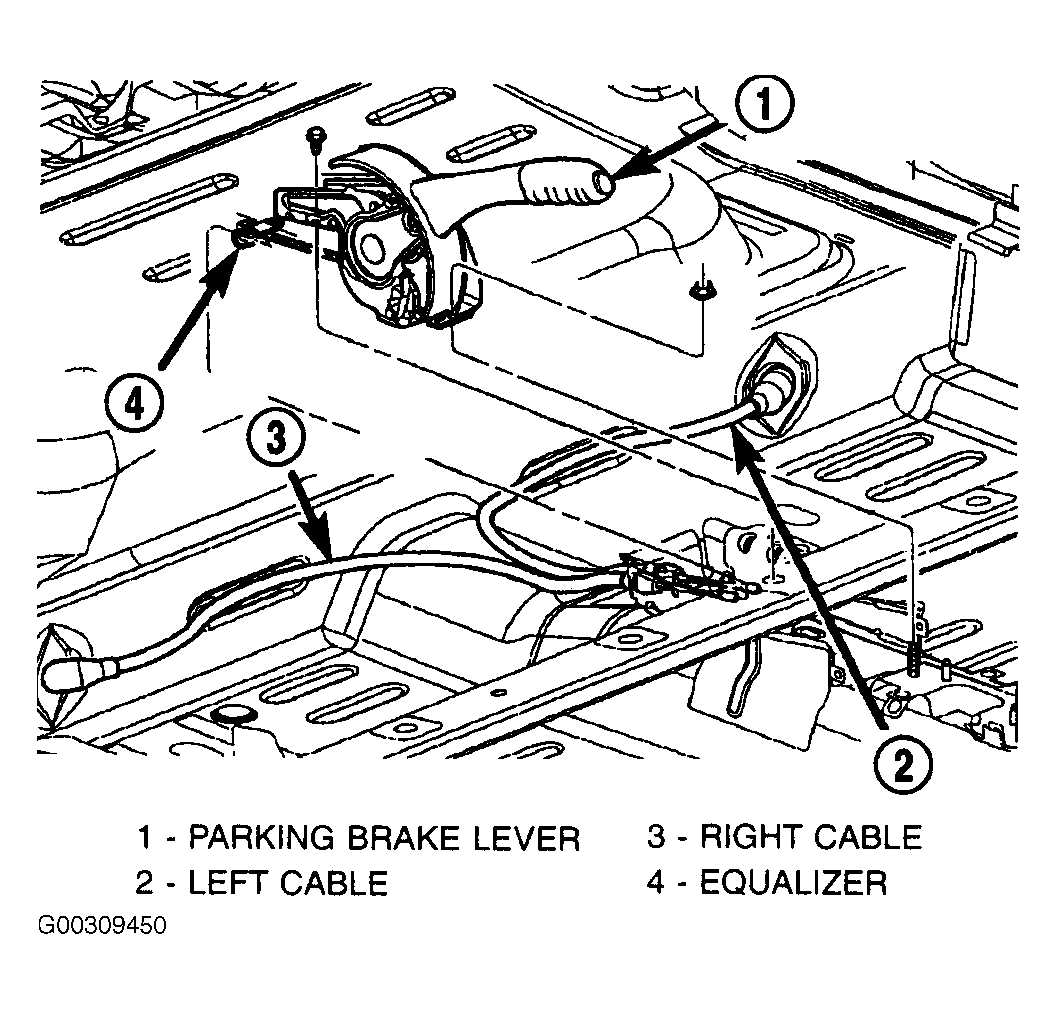 Courtesy of CHRYSLER CORP.