Mut-II Cannot Communicate With SRS
- Before proceeding, follow air bag service precautions. See SERVICE PRECAUTIONS
. Turn ignition switch to LOCK position. Disable air bag system. See DISABLING & ACTIVATING AIR BAG SYSTEM
.
- Disconnect the SRS-ECU connector. See Fig 1
. Connect the SRS Check Harness connector to the SRS-ECU connector. Check for continuity between Check Harness connector 5 terminals No. 20 and 21. See Figure
and Figure
. If continuity exists, go to step 4). If continuity does not exist, go to next step.
- Check SRS-ECU connector. If connector is okay, repair and recheck. If connector is okay and problem is still present, check harness between SRS-ECU and ground. Repair as necessary.
- Turn ignition on. Check voltage between Check Harness connector 5 terminal No. 13 and body ground and Check Harness connector 5 terminal No. 14 and body ground. See Figure
and Figure
. If 9 volts or more exists, go to next step. If 9 volts or more does not exist, go to step 6).
- Check harness between SRS-ECU and data link connector. Repair as necessary. If harness is okay, replace SRS-ECU.
- Check connectors B-41, B-43, B-05, and B-42 (B-50, B-07, B-51 and B-49 on Talon). See WIRING DIAGRAMS
. Repair connectors as necessary. If connectors are okay and problem is still present, check harness between SRS-ECU and ignition switch. Repair as necessary.
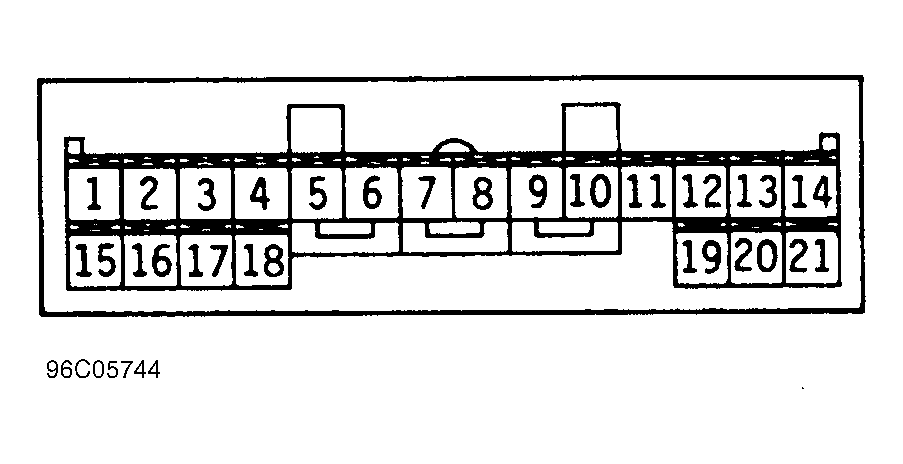 Courtesy of MITSUBISHI MOTOR SALES OF AMERICA