Rear Disc Brake Mounting and Hardware Inspection
- Rear Brake Caliper Bracket Replacement »Remove
- Remove the disc brake caliper from the caliper mounting bracket (2).
 Courtesy of GENERAL MOTORS COMPANY
- Remove the disc brake pads (1) from the caliper mounting bracket (2).
- Inspect the disc brake pad mounting hardware (3) for the following:
- Missing mounting hardware.
- Excessive corrosion.
- Bent pad retainer spring.
- Looseness at the brake caliper mounting bracket.
- Looseness at the disc brake pads.
- Excessive contaminants in the brake caliper mounting bracket surface and threads.
- If any of the conditions listed are found, the disc brake pad mounting hardware requires replacement.
- Ensure the disc brake pads are held firmly in place on the caliper mounting bracket, yet slide easily on the mounting hardware without binding.
- Inspect the brake caliper mounting hardware for the following:
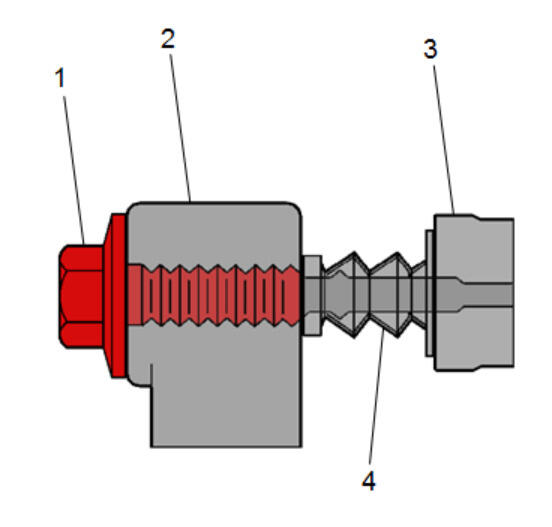 Courtesy of GENERAL MOTORS COMPANY
- Binding
- Seizing
- Looseness in the brake caliper mounting bracket (3).
- Bent or damaged brake caliper mounting bolts (1).
- Cracked or torn boots (4).
- Missing boots.
- Bent or damaged brake caliper mounting bracket (3).
- Cracked or damaged brake caliper (2).
- If any of the conditions listed are found then the brake caliper mounting hardware requires replacement.
- Install the disc brake pads to the caliper mounting bracket.
- Install the disc brake caliper to the mounting bracket.
- Rear Brake Caliper Bracket Replacement »Install