Ignition Lock Cylinder Case Replacement
Ignition Lock Cylinder Case Replacement
Removal Procedure
Caution: Refer to Restraint System Service Precautions.
1. Disable the SIR system. Refer to SIR Disabling and Enabling.
2. Remove the ignition switch.
3. Remove the turn signal cancel cam.
4. Remove the park lock cable from the lock cylinder housing.
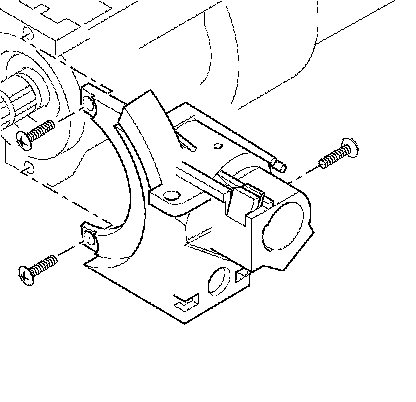
5. Remove 3 TORX(R) screws.
6. Remove the lock cylinder housing from the steering column.
Installation Procedure
Notice: Refer to Fastener Notice.
1. Install 3 TORX(R) screws into the lock cylinder housing.
Tighten the TORX(R) screws to 7 N.m (62 lb in).
2. Install the turn signal cancel cam.
3. Install the park lock cable into the lock cylinder housing.
4. Install the ignition switch.
5. Enable the SIR system. Refer to SIR Disabling and Enabling.