Parking Brake Warning Switch: Service and Repair
Parking Brake Indicator Switch Replacement
Removal Procedure
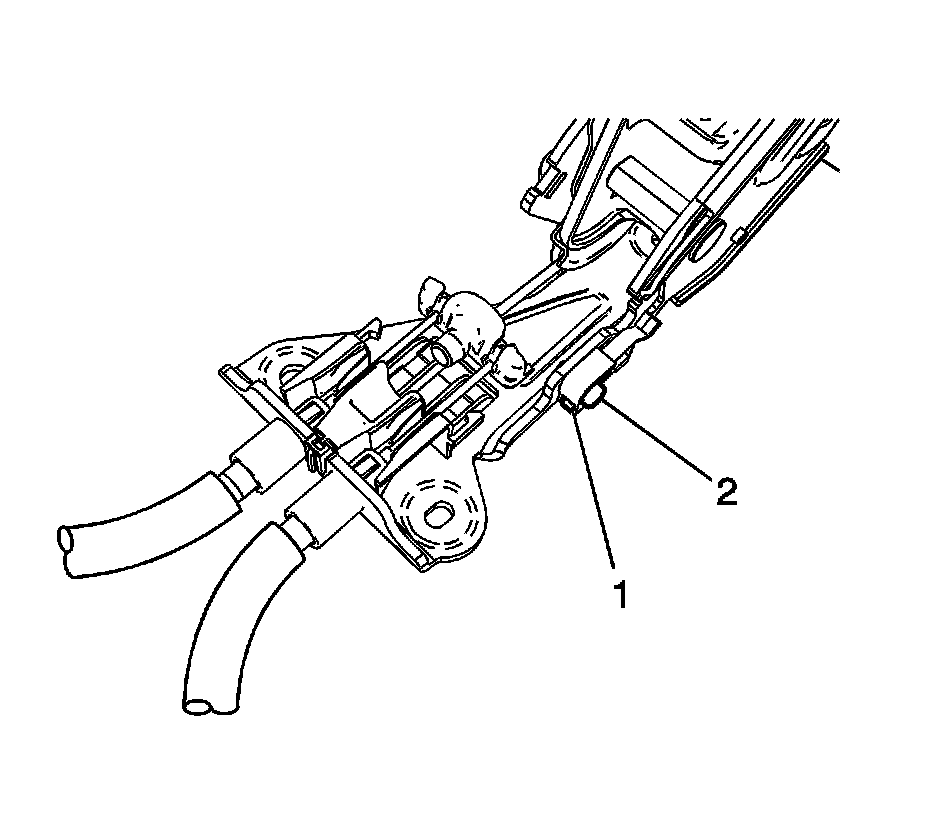
1. Remove the console rear trim plate.
2. Disconnect the warning lamp switch electrical connector (1).
3. Remove the warning lamp switch mounting screw (2).
4. Remove the switch from the park brake lever assembly.
Installation Procedure
1. Align the park brake warning lamp switch locating tab to the locating hole on the park brake lever assembly.
2. Install the switch to the park brake lever.
Notice: Refer to Fastener Notice.
3. Install the park brake warning lamp switch mounting screw (2).
Tighten the screw to 3 N.m (27 lb in).
4. Connect the park brake warning lamp switch electrical connector (1).
5. Install the console rear trim plate.
6. Verify correct park brake warning lamp operation.