Removal Procedure
- Disconnect the negative battery cable.
- Disable the SIR system. See AIR BAG RESTRAINT SYSTEMS
article for 2001. For 2002, see AIR BAG RESTRAINT SYSTEMS
article.
- With a flat-bladed tool remove the Instrument panel (IP) defroster grille.
- Remove the IP outer trim cover screws.
- Remove the outer trim covers from the IP carrier.
- Remove the screws for the HVAC control. Leave the harnesses connected to the HVAC control and position aside. For 2001, see A/C-HEATER CONTROL PANEL
. For 2002, see HVAC CONTROL ASSEMBLY
.
- Remove the radio screws.
- Disconnect the electrical connectors and coaxial cable from the radio.
- Remove the radio from the IP carrier.
- Remove the right IP trim panel screws.
- Remove the right IP trim panel from the IP carrier (3).
- Remove the IP trim pad.
- Remove the IP SIR module.
- Remove the air distribution ducts screws.
- Remove the air distribution duct.
- Remove the steering wheel. For 2001, see STEERING WHEEL
. For 2002, see STEERING WHEEL REPLACEMENT
.
- Remove the tilt lever. See TILT LEVER REPLACEMENT -- ON VEHICLE
.
- Remove the washer lever. For 2001, see WIPER/WASHER SWITCH
. For 2002, see WINDSHIELD WIPER & WASHER SWITCH REPLACEMENT -- ON VEHICLE
.
- Remove the screws (4) from the IP carrier (3).
- Remove the IP carrier (3) from the lower tie bar (2).
- Remove the IP carrier (3) from the vehicle.
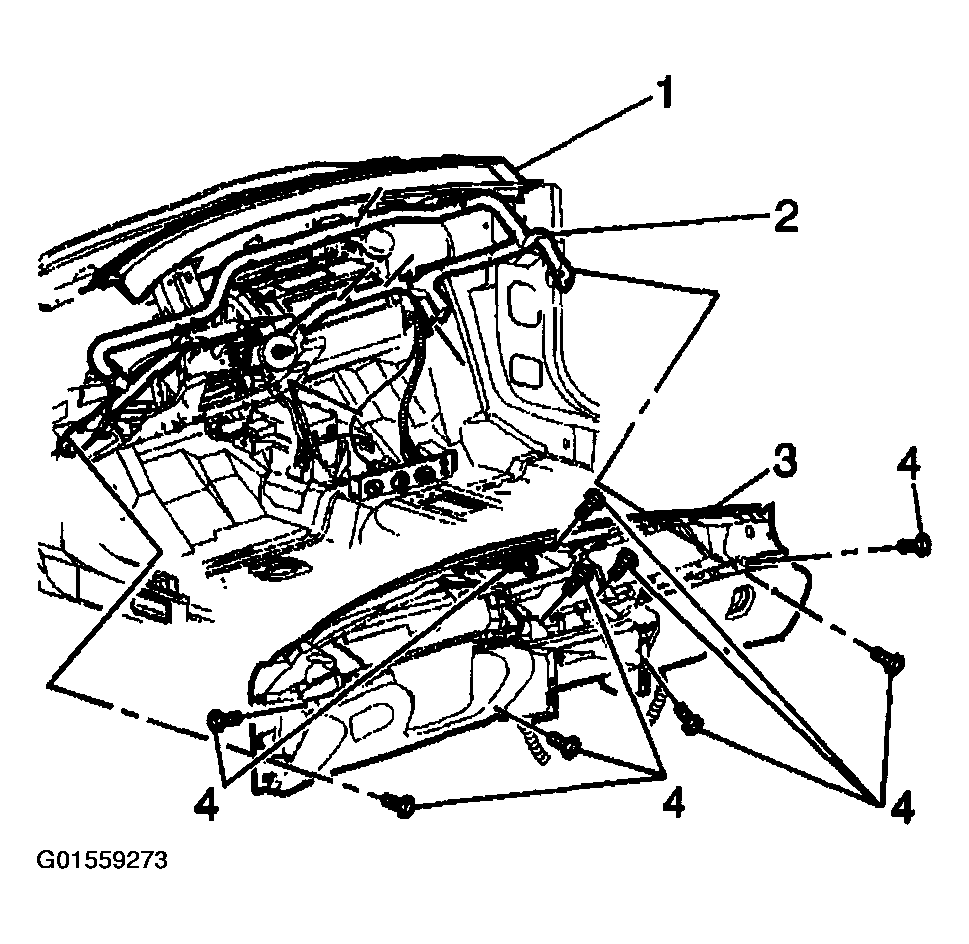 Courtesy of GENERAL MOTORS CORP.