Auxiliary Video Module (AVM)
Auxiliary Video Module (AVM):
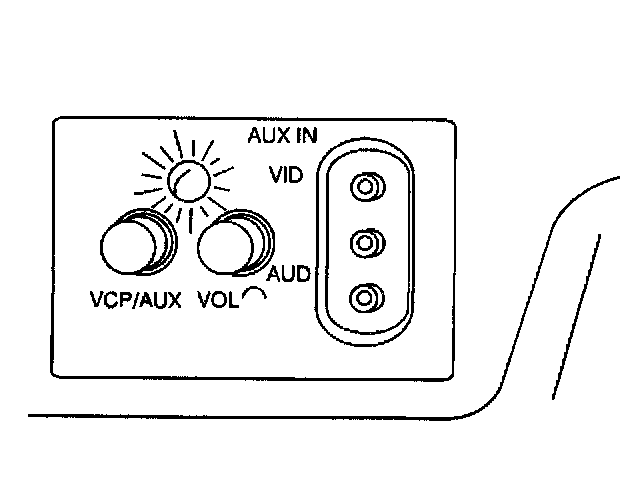
The AVM contains the VCP/AUX switch, volume control for the rear speakers, RCA-style audio/video input jacks, and a red/green status indicator. Press
the switches lightly to extend them. The volume control on the AVM is used only to control audio from a video tape or an auxiliary video source from the rear speakers when video tape or other video source is used. Headphone volume is controlled only at the RSA or the Second And Third Seat Audio (SSA/TSA) controls.
The VCP/AUX switch allows you to select either the Video Cassette Player (VCP) or another auxiliary video source such as a video game, camcorder or similar device.
In order to listen to the video through the rear speakers, the in-dash radio system and the Rear Seat Audio (RSA) must be OFF.
Please note that the VCP/AUX switch is not an ON/OFF switch. The video device must be turned on/off at the device itself. Otherwise, the video source may continue to operate without indication. This could drain the battery.
Some auxiliary video devices may require household current (120V AC) to power them. In order to use the devices in your vehicle, you will need what is called a 12V DC-to-120V AC power invertor (not a power convertor). They are commonly available at larger specialty computer and electronic retail outlets. The invertor plugs into either the front or the rear accessory power outlet, and the video device plugs into the invertor. Refer to the manufacturer's instructions for proper usage.
Status Indicator
The status indicator is located on the Auxiliary Video Module (AVM) just above the VCP/AUX and VOL controls (refer to the previous illustration). The status indicator has two purposes:
^ indicates the operating status of the system, by glowing green or red.
^ indicates if the video entertainment system is ON, by glowing green when the video screen is unlatched (down position).
This function is tied to a temperature sensor inside the AVM. It senses the temperature inside the vehicle. The indicator will glow green if the operating status is OK, and red if it is not. The video entertainment system automatically turns off when the vehicle's interior temperature exceeds 65°C (149°F) or falls bellow 0°C (32°F), and then the indicator turns red. The interior temperature must be back to normal before the video entertainment system comes back on. To do this, use the vehicle's climate control system. When the indicator turns back to green, that means the video entertainment system is ready for operation.