DTC B0160: Temperature Sensor Circuit Low
- Turn ignition switch to ON position. Perform driver information system diagnostic system check. See DRIVER INFORMATION SYSTEMS DIAGNOSTIC SYSTEM CHECK
under SELF-DIAGNOSTIC SYSTEM. Go to next step.
- If Driver Information Display (DID) displays SC, go to next step. If DID does not display SC, DTC is not present at this time. Check for intermittent or poor connections in related electrical connections. Repair wiring or connections as necessary.
- Turn ignition switch to OFF position. Disconnect ambient air temperature sensor. Turn ignition switch to ON position. If DID displays OC, go to step 5
. If DID does not display OC, go to next step.
- Disconnect DID connector. Using a DVOM, measure resistance between ground and Light Green/Black wire between ambient air temperature sensor connector and DID connector terminal No. 10. See Fig 1
. If resistance is less than 5 ohms, repair short to ground in Light Green/Black wire and go to step 8
. If resistance is 5 ohms or more, go to step 7
.
- Check for intermittent or poor connections in related electrical connections. Inspect wiring harness for damage or intermittent short to ground. Repair wiring or connections as necessary. If connections are in good condition, go to next step.
- Replace ambient air temperature sensor. Retest system for normal operation. See DRIVER INFORMATION SYSTEMS DIAGNOSTIC SYSTEM CHECK
under SELF-DIAGNOSTIC SYSTEM.
- Replace Driver Information Display (DID). Calibrate DID compass. See COMPASS CALIBRATION
under ADJUSTMENTS. Go to next step.
- Using scan tool, clear DTCs present. Operate vehicle under conditions necessary to reset DTC. If DTC resets, go to step 2
.
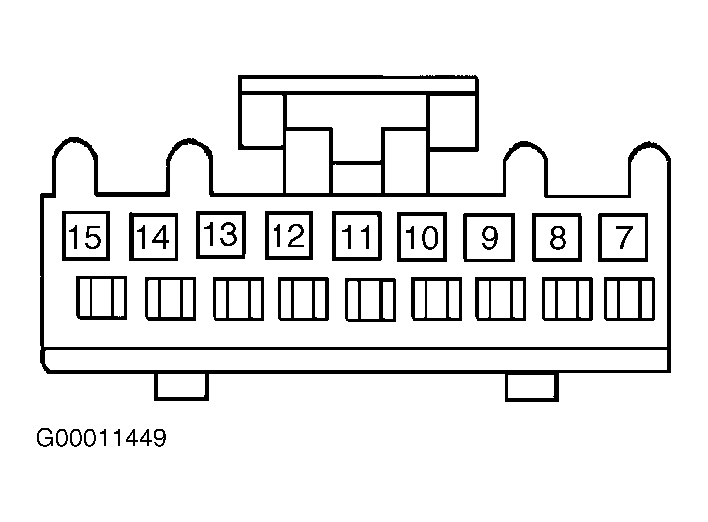 Courtesy of GENERAL MOTORS CORP.