Trip Calculator Mode
In the trip calculator mode, pressing the MODE button cycles through the five displays. Pressing the MODE button after the last trip calculator display returns the DIC to the OFF mode.Press the MODE button in order to toggle through the following information displays:
^ Compass/Temp
^ Average fuel economy
^ Instant fuel economy
^ Trip range
^ Fuel used
^ Average speed
^ OFF
The DIC performs the following error detection where possible:
^ No serial data stream for 10 seconds
^ An open circuited fuel level sender
If the DIC is unable to calculate a value due to a missing speed signal, an error signal (E) displays when any of the following functions is selected:
^ AVG ECON
^ INST ECON
^ AVG SPEED
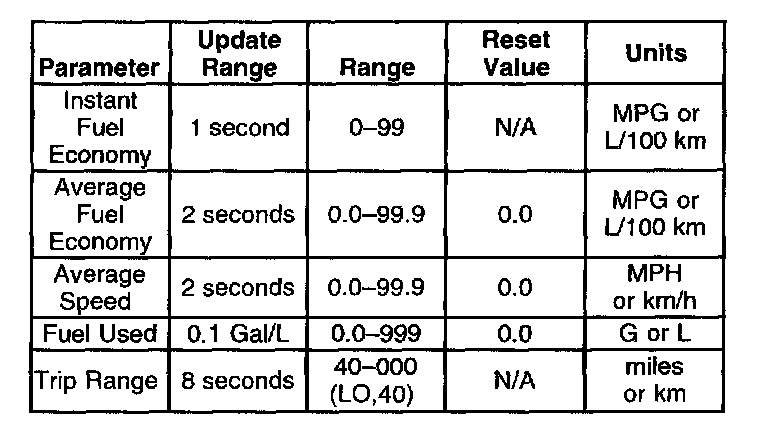
In the absence of vehicle communications, a double dash (--) displays in the digits section. The display format for each mode is indicated in the table: