Radio Operation
ETR AM/FM Stereo/Cassette:
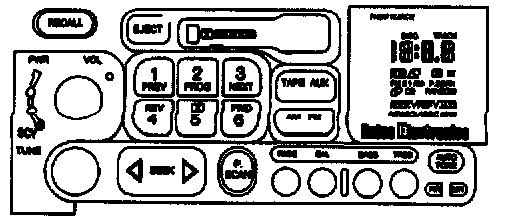
UPPER KNOB
This knob turns the radio on and off. Rotate the knob to control volume. The control ring behind the knob is the balance control.
Turn the ring clockwise to move speaker balance to the right and counterclockwise to move speaker balance to the left. Press the knob briefly to recall the station being played or the clock display. Press the knob to select the other side of the tape when playing a cassette.
LOWER KNOB
Turn the knob to manually select radio stations. When the radio is on and the tape player is off, press the knob to choose either the AM, FM1 or the FM2 band.
The control ring behind the lower knob fades the sound between the front and rear speaker.
"AM/FM"
Press "AM/FM" to receive either AM, FM1, or FM2. The lighted display shows the selection.
"P.SCAN"
Press and hold the "SEEK <| or |>" for 2 seconds, and "P.SCAN" will appear on the display. Use P. SCAN to listen to stations for a few seconds. The radio will go to a station, stop for a few seconds, then go on to the next station. Press "SEEK |>", <|", the upper knob, or a preset button to stop scanning.
BASS AND TREBLE CONTROLS
Bass
Slide the "BASS" lever up to increase bass and down to decrease bass. If a station is weak and noisy, move the "TREB" lever down to reduce the noise.
Treble
Slide the "TREB" lever up to increase treble and down to decrease treble. If a station is weak and noisy. slide the "TREB" lever down to reduce the noise.
"SEEK"
Press the "SEEK <| or |>" and the radio will tune to next higher or lower station with enough signal strength to be heard clearly, and stay there.
CLOCK
To set the clock display on the radio, the ignition lock cylinder must be in the "ACCESSORY" or "RUN" position and the radio must he off. To set the clock:
1. Press "SET."
2. Within five seconds, press and hold "SEEK <|" until the correct hour appears.
3. Then press and hold "SEEK |>" until the correct minute appears.
PUSH BUTTONS
To preset four AM stations, four FM1, and four FM2 stations:
1. Tune in desired station.
2. Press "SET." Within 5 seconds, press a station button.
To preset three additional AM stations, three FM1, and three FM2 stations:
1. Tune in desired station.
2. Press "SET." Within 5 seconds, press any two adjacent buttons simultaneously.
The radio will tune to the pre-selected station when the push button or button pair is pressed.
Button pairing allows for seven AM, seven FM1 and seven FM2 stations to be preset for a total of twenty one preset stations.
If electrical power is interrupted by a blown fuse or a discharged battery, the stations must be reset.