Radio Operation
ETR AM/FM Stereo/Cassette:
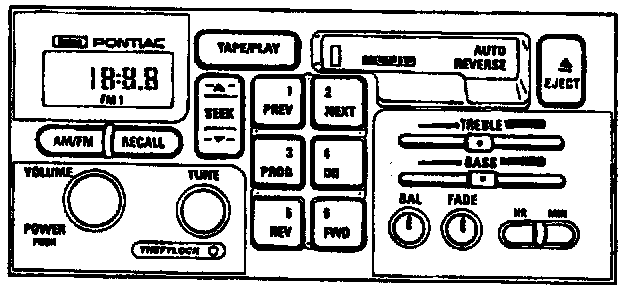
LOWER KNOB
Press this knob to turn the radio on and off.
UPPER KNOB
Turn this knob clockwise to increase volume. Turn it counterclockwise to decrease volume. The faster this knob is rotated, the quicker the radio increases or decreases the volume. This knob is capable of rotating continuously.
"AM/FM"
Press "AM/FM" to receive either AM, FM1, or FM2. The lighted display shows the selection.
TUNE KNOB
Press the "TUNE" knob lightly to release the knob. Turn the knob to choose desired radio stations. Press the "TUNE" knob back in to store it when not in use.
"RECALL"
Press "RECALL" to recall the station being played or the clock display. Press "RECALL" also to display the time when the ignition is off.
"SEEK"
Press the "SEEK <| or |>" and the radio will tune to next higher or lower station with enough signal strength to be heard clearly, and stay there.
"SCAN"
Press and hold the "SEEK <| or |>" for 2 seconds, and "SCAN" will appear on the display. Use SCAN to listen to stations for a few seconds. The radio will go to a station, stop for a few seconds, then go on to the next station. Press "SEEK |> or <|"
"P.SCAN"
Press "P.SCAN" to listen to each of the preset stations for a few seconds. The radio will start at the first preset station, stop for a few seconds, then continue to the next preset station. "P.SCAN" tuning will also recall the auto tone equalization stored for each preset station it scans. If a preset station has weak reception, the radio will not stop. Press "P.SCAN" or a preset button to stop scanning.
"SCV"
The audio system has a feature called speed compensated volume. The "SCV" control is located behind the upper knob. Adjust the "SCV" to compensate for road and wind noise. "SCV" can be set from the bottom (off) position to the top, which has the highest and fastest maximum volume increase.
"AUTO TONE"
The audio system has a feature called auto tone. Press the "AUTO TONE" button to choose a preset treble and bass equalization setting designed for country and western, classical, news, rock, pop, or jazz stations. Press the "AUTO TONE" button again to select from other settings. Tone control will return to the "TREB" and "BASS" knobs. When "TREB" and "BASS" knobs are used, control will return to them and the radio display will appear blank.
BASS AND TREBLE CONTROLS
The middle position of these controls is a detent. When these controls are used, the radio's auto tone setting will switch to manual.
Bass
Press the "BASS" knob lightly to release the knob. Turn the knob clockwise to increase bass or counterclockwise to decrease bass.
Treble
Press the "TREB" knob lightly to release the knob. Turn the knob Clockwise to increase treble or counterclockwise to decrease treble. If a station is weak and noisy, turn the "TREB" knob down to reduce the noise.
CLOCK
Press and hold "HR" until the correct hour appears on the radio display. Press and hold "MIN" until the correct minute appears. There will be a two-second delay before the clock goes into time set mode, and the colon on the display will blink while in this mode.
PUSH BUTTONS
To preset six AM stations, six FM1 stations, and six FM2 stations:
1. Tune in desired station.
2. Press "AUTO TONE" to select the graph that best suits the type of station selected.
3. Press and hold one of the six numbered buttons.
4. The sound will mute. When the sound returns, release the button.
Each numbered button pressed will return to the preset station and auto tone equalization selected for that button. Manual, "SEEK", or "P.SCAN" tuning will also recall the auto tone equalization stored for each button.
SPEAKER ADJUSTMENT
Balance Knob
Press the "BAL" knob lightly to release the knob. Turn the knob clockwise for right speakers or counterclockwise for left speakers. The middle position of these controls is a detent and balances the speakers.
Fade Knob
Press the "FADE" knob lightly to release the knob. Turn the knob clockwise for front speakers or counterclockwise for rear speakers. The middle position of these controls is a detent and balances the speakers.