Removal (All Others)
- Remove the steering wheel. Refer to HORN BUTTON and STEERING WHEEL in this article. Remove column-to-instrument panel trim cover. Using Plate Compressor (J-23653-A), compress lock plate. See Fig 1.
- Pry snap ring from groove. Discard snap ring. Lift off lock plate. Remove directional signal lever. Depress and unscrew hazard warning knob. Remove 3 switch mounting screws. On models with standard column, pull switch connector from bracket on column.
- Pull switch straight up, guiding wiring harness through column housing and protector. Remove wire protector by pulling downward out of column with pliers using tab provided.
- On models with tilt column, steering column must be in LOW position for directional signal switch removal. Removal procedure is same as for standard column.
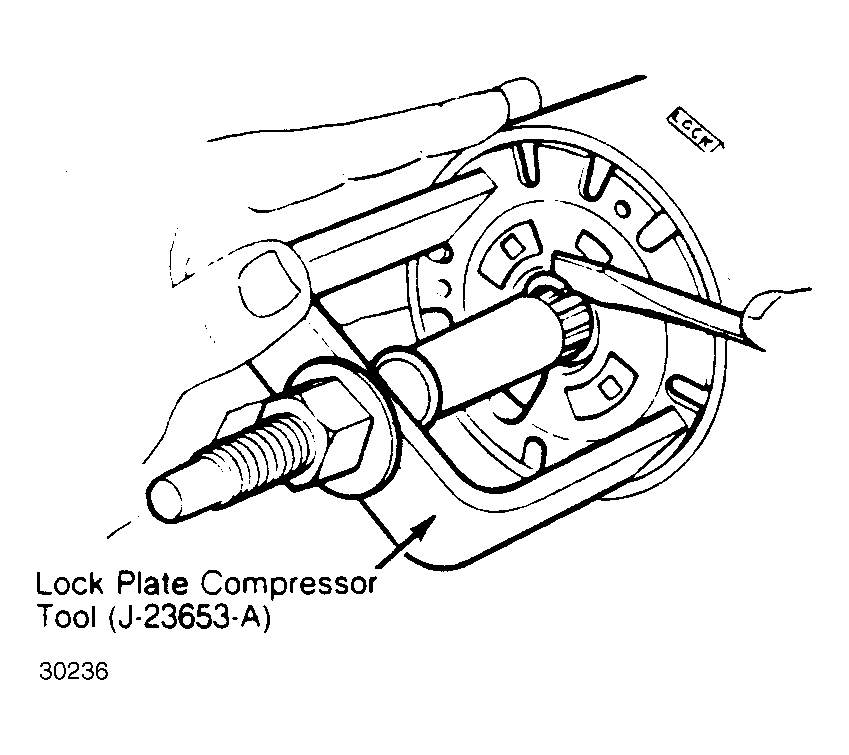 Courtesy of GENERAL MOTORS CORP.