Electronic Brake Control Module Replacement
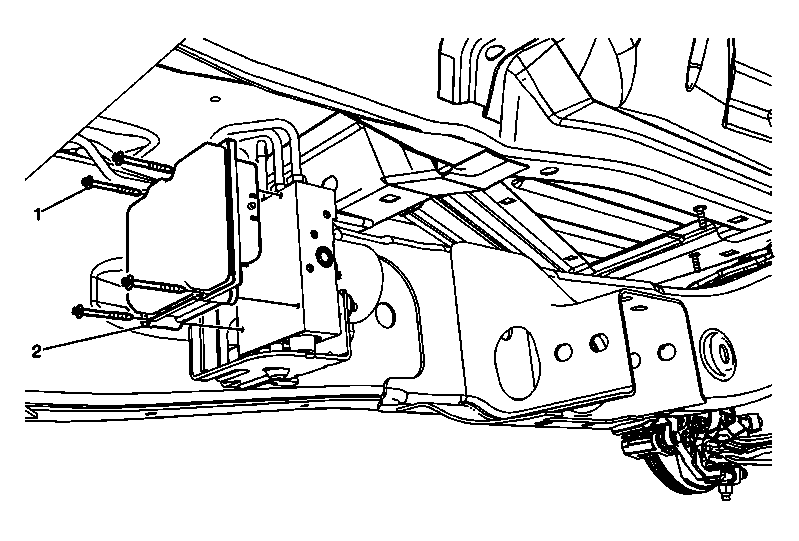 Courtesy of GENERAL MOTORS COMPANY
 Electronic Brake Control Module Replacement
| Callout |
Component Name |
CAUTION:
Always connect or disconnect the wiring harness connector from the EBCM/EBTCM with the ignition switch in the OFF position. Failure to observe this precaution could result in damage to the EBCM/EBTCM.
Preliminary Procedures
- Turn the ignition switch to the OFF position.
- Raise and support the vehicle. Refer to Lifting and Jacking the Vehicle
.
- Remove any dirt and debris from the area of the brake pressure modulator valve (BPMV)/electronic brake control module (EBCM) assembly.
|
| 1 |
EBCM Screw (Qty: 4)
Procedure
- Discard the EBCM screws.
- Install new EBCM screws.
- Tighten the EBCM screws in an X pattern.
Tighten
3 N.m (27 lb in) |
| 2 |
Electronic Brake Control Module (EBCM) Procedure
- Disconnect the EBCM electrical connector.
- Carefully pull the EBCM away from the BPMV. Do not force the components apart.
- Remove the EBCM to BPMV gasket and inspect for damage. Replace the gasket if necessary.
- Carefully align the EBCM and the brake pressure switch to the BPMV. Do not force the components together.
- After the installation is complete, program the EBCM. Refer to Control Module References
.
|