Removal & Installation
- Disable air bag system. See appropriate AIR BAG RESTRAINT SYSTEMS article. Pull "A" pillar trim panels away from windshield "A" pillar to disengage retainer clips. Grasp center of air outlet vent and use a flat-blade tool to release retainers inside instrument panel outlet vents at top and bottom.
- Remove fasteners from inside air outlet vent openings in instrument panel upper trim pad. See Fig 1
. Lift instrument panel upper trim pad upward from rear edge and over instrument cluster to disengage retainers from instrument cluster trim plate. Lift trim pad at an angle, and slide rearward to disengage retainers at the front of the instrument panel. It may be necessary to push down on right front edge of trim pad to disengage retainer from carrier forward of passenger's air bag. Disconnect harness connector and remove instrument panel upper trim pad.
- Remove 2 screws, one on each side of cluster. Disconnect left and right DIC switch connectors. Rotate cluster trim rearward from top and lift trim and out of instrument panel retainer. Remove fasteners of appropriate Driver's Information Center (DIC) switch and remove. To install, reverse removal procedure.
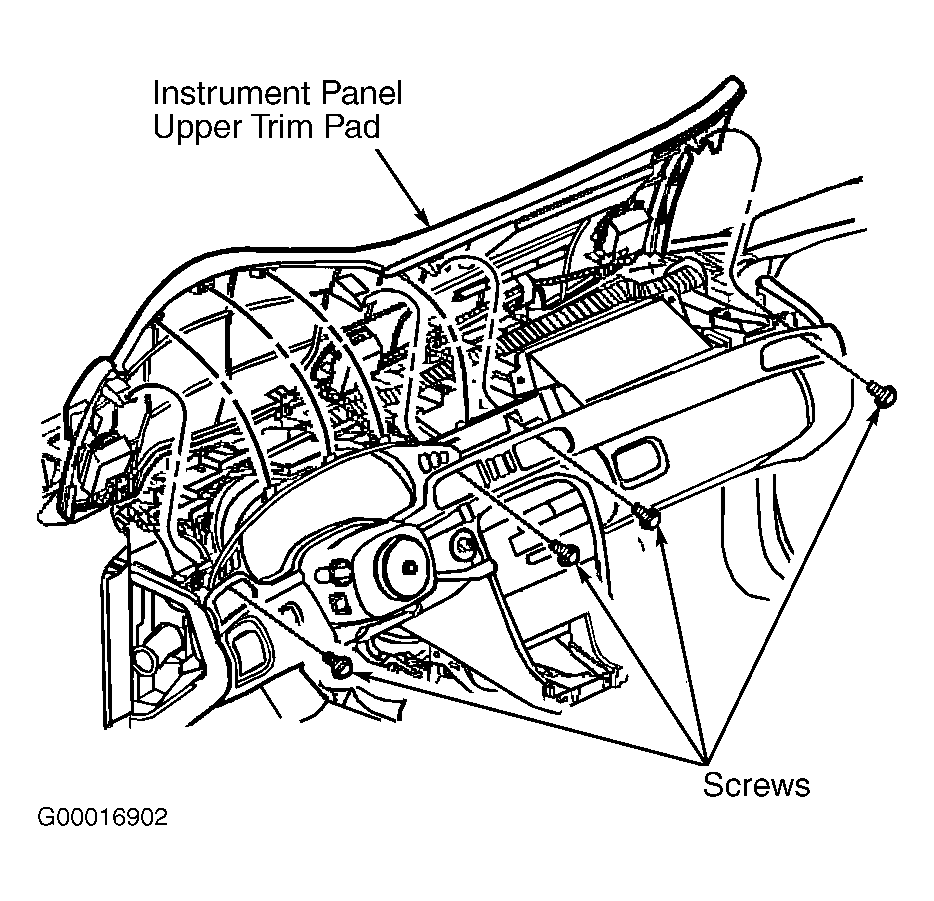 Courtesy of GENERAL MOTORS CORP.