XM Radio Preset Memory Is Lost (Without AcuraLink)
Audio System Symptom Troubleshooting - XM radio preset memory is lost
XM radio preset memory is lost (without AcuraLink)
NOTE:
- Check the vehicle battery condition first Testing and Inspection.
- Check the connectors for poor connections or loose terminals.
- If you can only tune to channel 000, 001, 174, and 247, make sure the audio unit is set to channel mode (see owner's manual), if it is set to channel mode, call XM radio client support, and check the account activation status.
1. Turn the ignition switch to ON (II).
2. Turn on the audio unit and set each of the XM radio channel preset buttons.
Does each of the XM radio channel preset buttons set properly?
YES -
Go to step 3.
NO -
Go to step 5.
3. Turn the ignition switch to LOCK (0) for 1 minute, then turn it back to ON (II).
4. Test all of the XM radio channel preset buttons for proper recall operation.
Do the preset buttons recall the set radio stations?
YES -
Intermittent failure, the system is normal at this time. Check connections at the audio unit.�
NO -
Go to step 5.
5. Turn the ignition switch to LOCK (0).
6. Measure the voltage between XM receiver connector A (14P) terminal No. 1 and body ground.
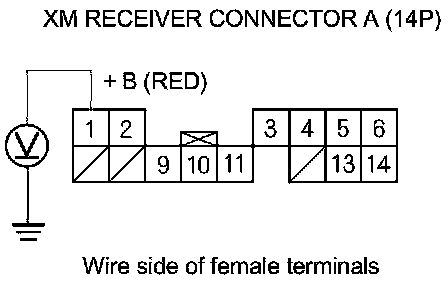
Is there less than 0.2 V?
YES -
Go to step 7.
NO -
Repair an open in the wire between the audio unit and the XM receiver.�
7. Turn the ignition switch to ON (II).
8. Measure the voltage between XM receiver connector A (14P) terminal No. 2 and body ground.
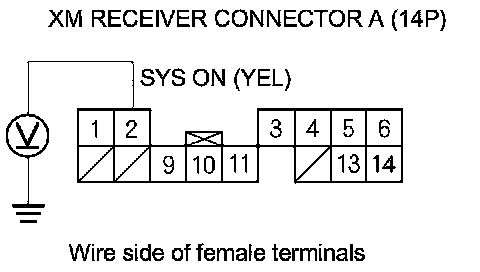
Is there less than 0.2 V?
YES -
Go to step 9.
NO -
Repair an open in the wire between the audio unit and the XM receiver.�
9. Measure the voltage between XM receiver connector A (14P) terminal No. 11 and body ground.
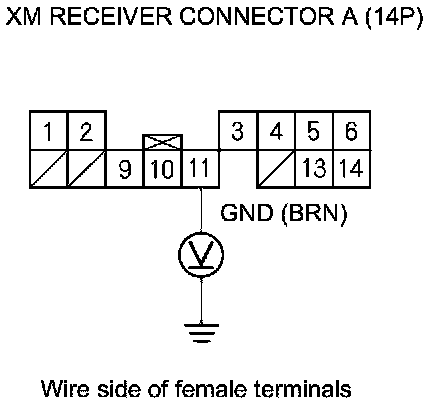
Is there less than 0.2 V?
YES -
Replace the XM receiver XM Receiver Removal/Installation.�
NO -
Repair an open in the wire between the audio unit and the XM receiver.�