HVAC Switch Communication Line Circuit Troubleshooting
HVAC Switch Communication Line Circuit Troubleshooting
1. Turn the ignition switch to LOCK (0), or press the engine start/stop button to select the OFF mode.
2. Disconnect audio-navigation and HVAC switch panel connector A (20P) or audio and HVAC switch panel connector A (20P).
3. Check for continuity between audio-navigation and HVAC switch panel connector A (20P) or audio and HVAC switch panel connector A (20P) terminal No. 3 and body ground.
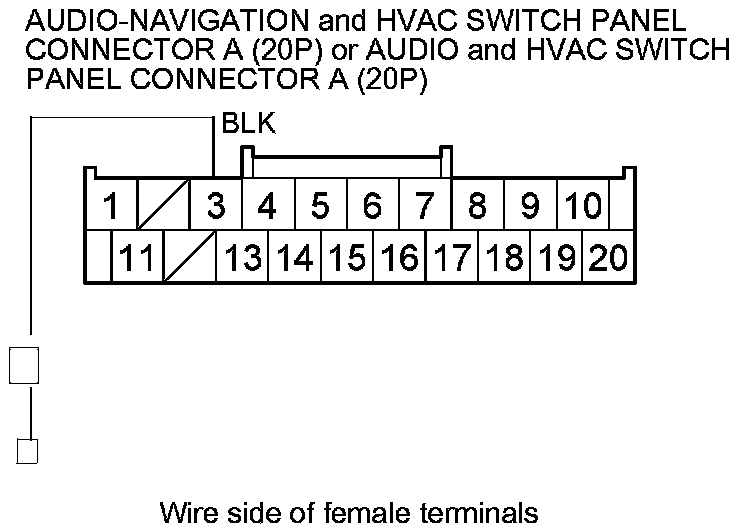
Is there continuity?
YES -
Go to step 4.
NO -
Check for an open in the wire between the audio-navigation and HVAC switch panel or the audio and HVAC switch panel and body ground. If the wire is OK, check for poor body ground at G501 Harness Locations.�
4. If the following switches do not work, go to the step indicated below respectively.
- DRIVER'S SIDE MODE CONTROL button, go to step 5.
- DRIVER'S SIDE TEMPERATURE CONTROL switch, go to step 5.
- DRIVER'S SIDE AUTO button, go to step 5.
- PASSENGER'S SIDE MODE CONTROL button, go to step 16.
- PASSENGER'S SIDE TEMPERATURE CONTROL switch, go to step 16.
- PASSENGER'S SIDE AUTO button, go to step 16.
- FAN ON/OFF button, go to step 27.
- FAN CONTROL button, go to step 27.
- SYNC button, go to step 27.
- WINDSHIELD DEFROST button, go to step 38.
- RECIRCULATION button, go to step 38.
- AIR CONDITIONING button, go to step 38.
- REAR WINDOW DEFOGGER/MIRROR DEFOGGER button, go to step 38.
5. Turn the ignition switch to ON (II), or press the engine start/stop button to select the ON mode.
6. Measure the voltage between climate control unit connector B (24P) terminals and body ground as shown.
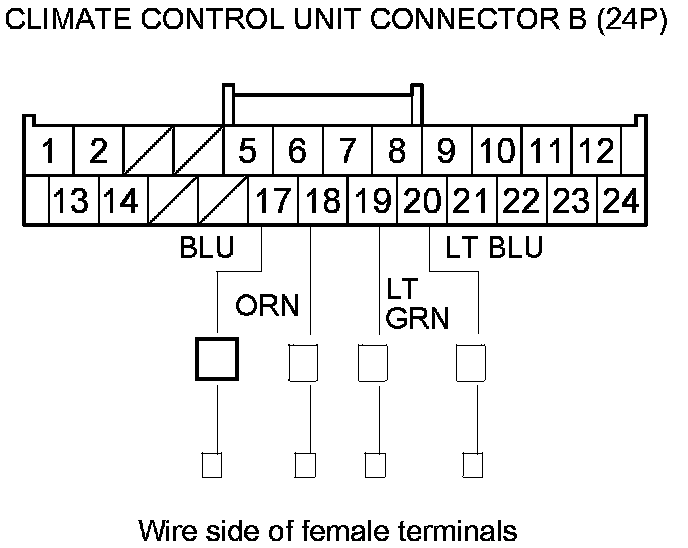
Is there about 5 V?
YES -
Go to step 7.
NO -
Go to step 11.
7. Turn the ignition switch to LOCK (0), or press the engine start/stop button to select the OFF mode.
8. Disconnect audio-navigation and HVAC switch panel connector B (32P) or audio and HVAC switch panel connector B (32P).
9. Turn the ignition switch to ON (II), or press the engine start/stop button to select the ON mode.
10. Measure the voltage between audio-navigation and HVAC switch panel connector B (32P) or audio and HVAC switch panel connector B (32P) terminals and body ground as shown.
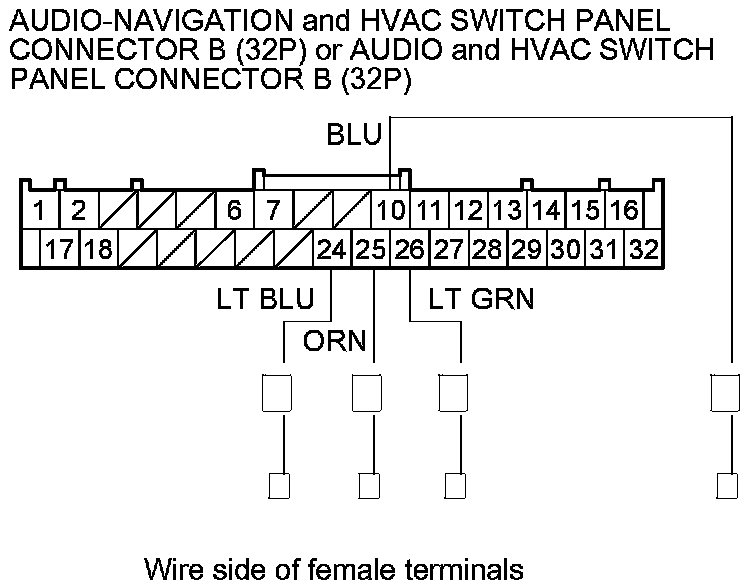
Is there about 5 V?
YES -
Substitute a known-good audio-navigation and HVAC switch panel or the audio and HVAC switch panel, and recheck. If the symptom goes away, replace the original audio-navigation and HVAC switch panel Audio-Navigation and HVAC Switch Panel Removal/Installation or the audio and HVAC switch panel Audio and HVAC Switch Panel Removal/Installation.�
NO -
Repair an open in the wires between the climate control unit and the audio-navigation and HVAC switch panel or the audio and HVAC switch panel.�
11. Turn the ignition switch to LOCK (0), or press the engine start/stop button to select the OFF mode.
12. Disconnect climate control unit connector B (24P) and audio-navigation and HVAC switch panel connector B (32P) or audio and HVAC switch panel connector B (32P).
13. Check for continuity between climate control unit connector B (24P) terminals and body ground as shown.
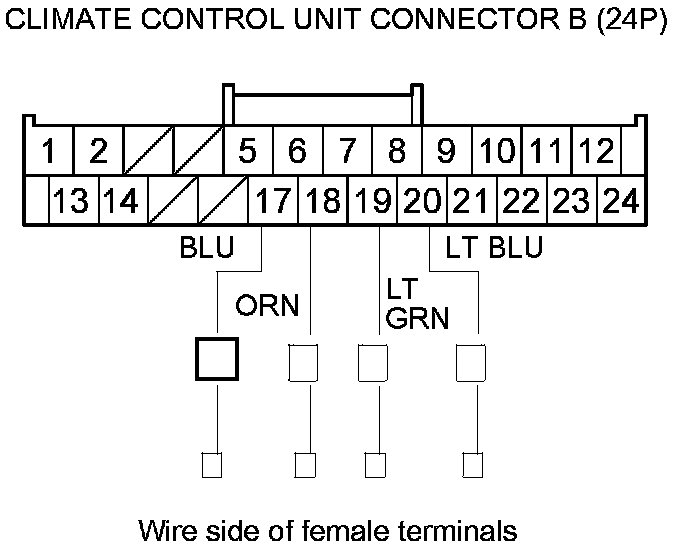
Is there continuity?
YES -
Repair a short to body ground in the wire(s) between the climate control unit and the audio-navigation and HVAC switch panel or the audio and HVAC switch panel.�
NO -
Go to step 14.
14. Reconnect audio-navigation and HVAC switch panel connector B (32P) or audio and HVAC switch panel connector B (32P).
15. Check for continuity between audio-navigation and HVAC switch panel connector B (32P) or audio and HVAC switch panel connector B (32P) terminals and body ground as shown. Do not press the switch or the button.
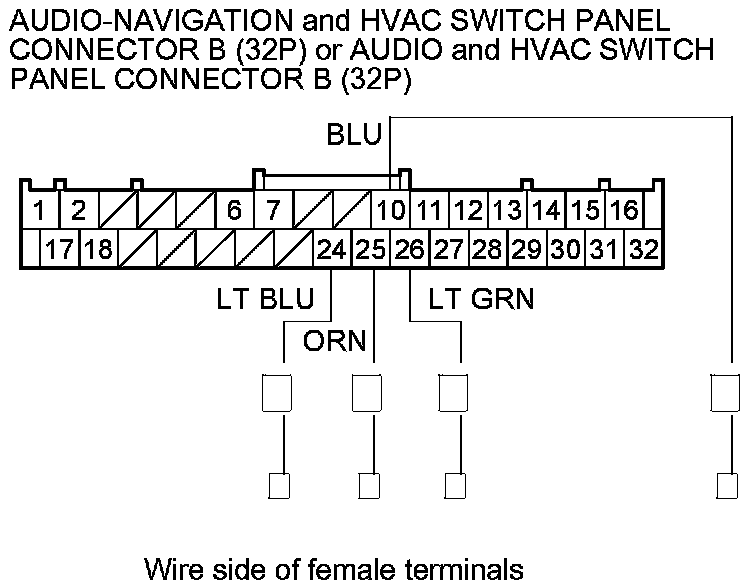
Is there continuity?
YES -
Substitute a known-good audio-navigation and HVAC switch panel or the audio and HVAC switch panel, and recheck. If the symptom goes away, replace the original audio-navigation and HVAC switch panel Audio-Navigation and HVAC Switch Panel Removal/Installation or the audio and HVAC switch panel Audio and HVAC Switch Panel Removal/Installation.�
NO -
Substitute a known-good climate control unit, and recheck. If the symptom/indication goes away, replace the original climate control unit Service and Repair.�
16. Turn the ignition switch to ON (II), or press the engine start/stop button to select the ON mode.
17. Measure the voltage between climate control unit connector B (24P) terminals and body ground as shown.
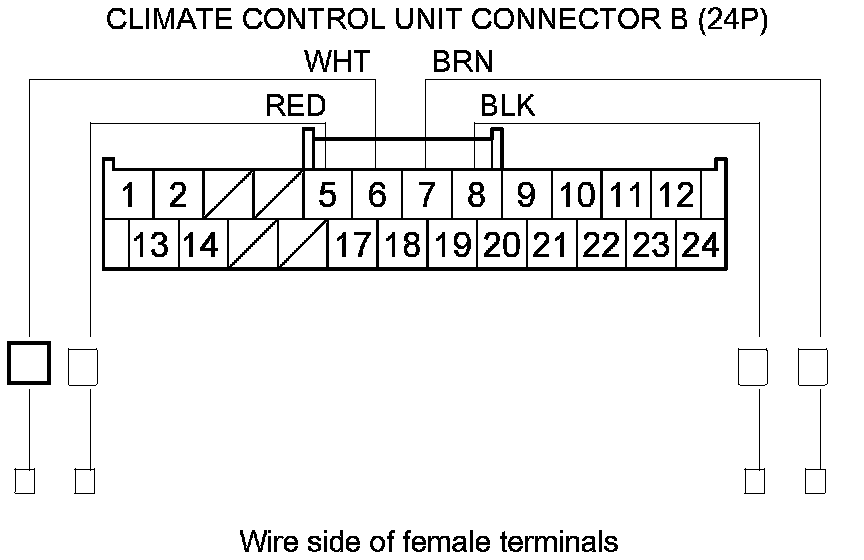
Is there about 5 V?
YES -
Go to step 18.
NO -
Go to step 22.
18. Turn the ignition switch to LOCK (0), or press the engine start/stop button to select the OFF mode.
19. Disconnect audio-navigation and HVAC switch panel connector B (32P) or audio and HVAC switch panel connector B (32P).
20. Turn the ignition switch to ON (II), or press the engine start/stop button to select the ON mode.
21. Measure the voltage between audio-navigation and HVAC switch panel connector B (32P) or audio and HVAC switch panel connector B (32P) terminals and body ground as shown.
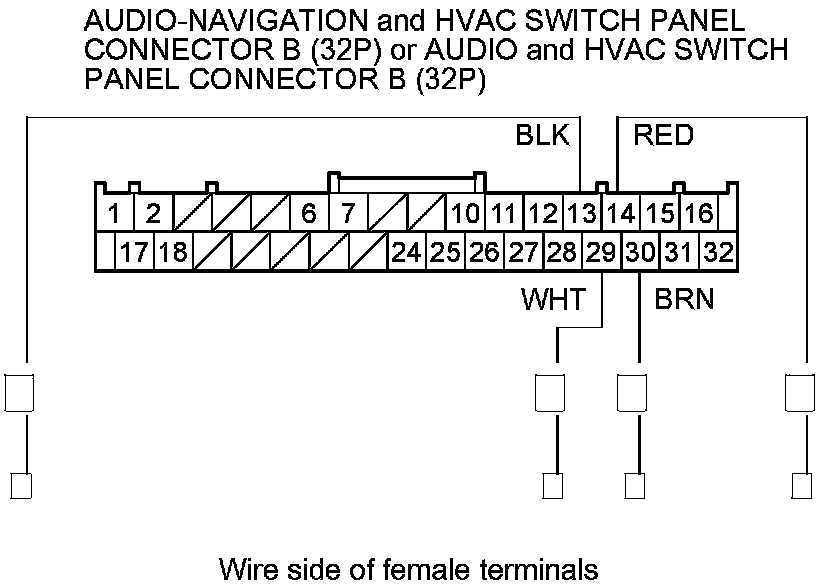
Is there about 5 V?
YES -
Substitute a known-good audio-navigation and HVAC switch panel or the audio and HVAC switch panel, and recheck. If the symptom goes away, replace the original audio-navigation and HVAC switch panel Audio-Navigation and HVAC Switch Panel Removal/Installation or the audio and HVAC switch panel Audio and HVAC Switch Panel Removal/Installation.�
NO -
Repair an open in the wires between the climate control unit and the audio-navigation and HVAC switch panel or the audio and HVAC switch panel.�
22. Turn the ignition switch to LOCK (0), or press the engine start/stop button to select the OFF mode.
23. Disconnect climate control unit connector B (24P) and audio-navigation and HVAC switch panel connector B (32P) or audio and HVAC switch panel connector B (32P).
24. Check for continuity between climate control unit connector B (24P) terminals and body ground as shown.
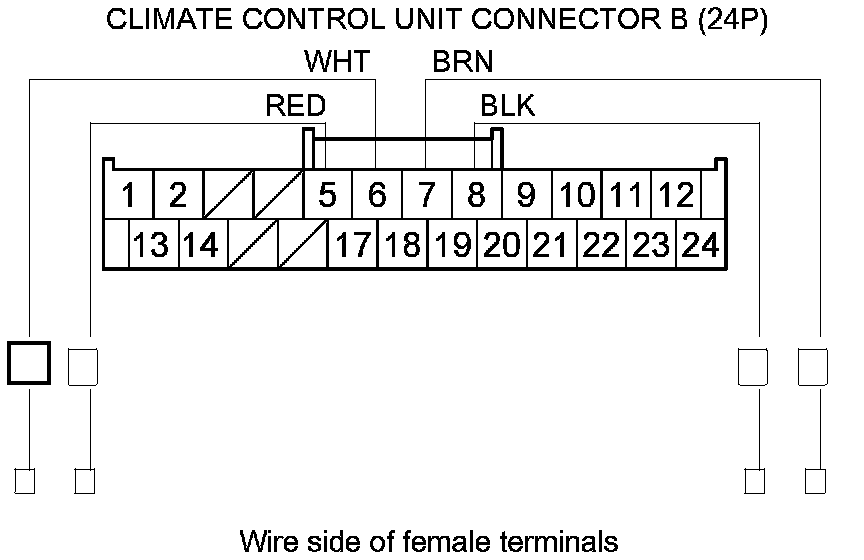
Is there continuity?
YES -
Repair a short to body ground in the wire(s) between the climate control unit and the audio-navigation and HVAC switch panel or the audio and HVAC switch panel.�
NO -
Go to step 25.
25. Reconnect audio-navigation and HVAC switch panel connector B (32P) or audio and HVAC switch panel connector B (32P).
26. Check for continuity between audio-navigation and HVAC switch panel connector B (32P) or audio and HVAC switch panel connector B (32P) terminals and body ground as shown. Do not press the switch or the button.
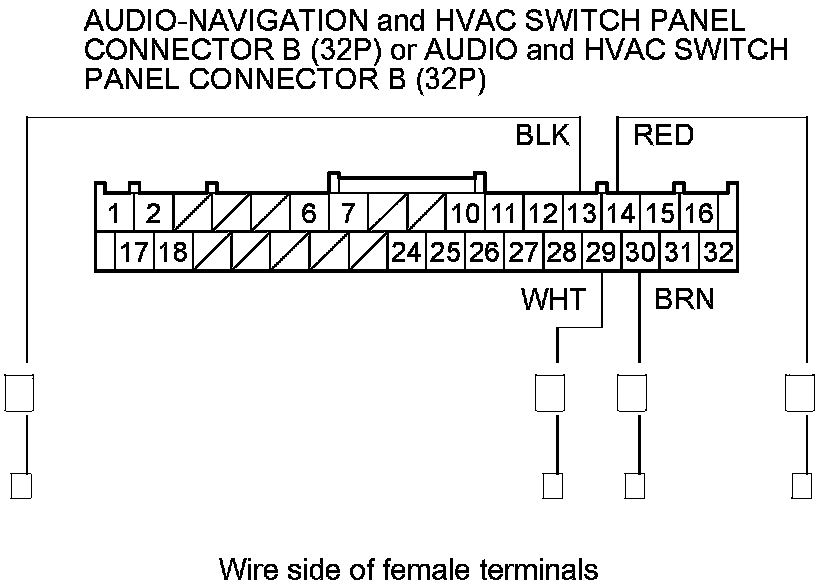
Is there continuity?
YES -
Substitute a known-good audio-navigation and HVAC switch panel or the audio and HVAC switch panel, and recheck. If the symptom goes away, replace the original audio-navigation and HVAC switch panel Audio-Navigation and HVAC Switch Panel Removal/Installation or the audio and HVAC switch panel Audio and HVAC Switch Panel Removal/Installation.�
NO -
Substitute a known-good climate control unit, and recheck. If the symptom/indication goes away, replace the original climate control unit Service and Repair.�
27. Turn the ignition switch to ON (II), or press the engine start/stop button to select the ON mode.
28. Measure the voltage between climate control unit connector B (24P) terminals and body ground as shown.
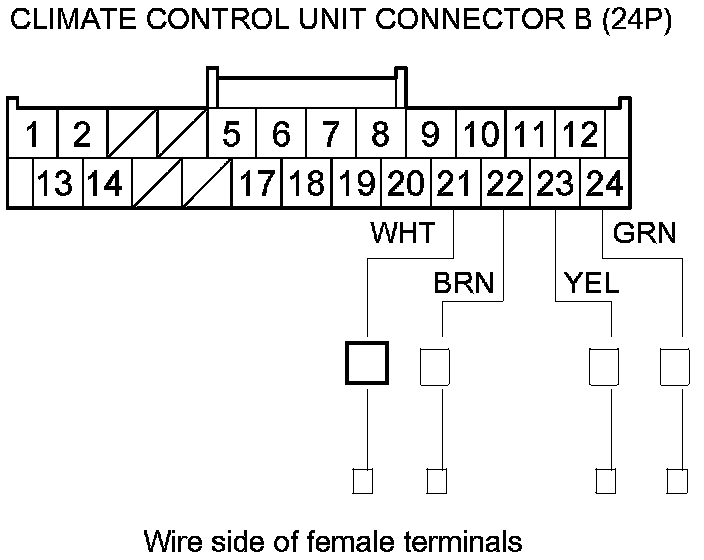
Is there about 5 V?
YES -
Go to step 29.
NO -
Go to step 33.
29. Turn the ignition switch to LOCK (0), or press the engine start/stop button to select the OFF mode.
30. Disconnect audio-navigation and HVAC switch panel connector B (32P) or audio and HVAC switch panel connector B (32P).
31. Turn the ignition switch to ON (II), or press the engine start/stop button to select the ON mode.
32. Measure the voltage between audio-navigation and HVAC switch panel connector B (32P) or audio and HVAC switch panel connector B (32P) terminals and body ground as shown.
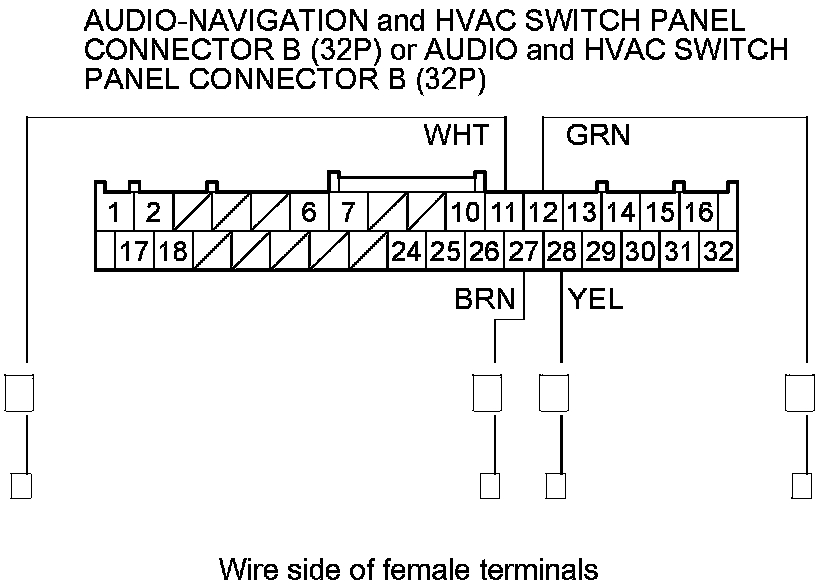
Is there about 5 V?
YES -
Substitute a known-good audio-navigation and HVAC switch panel or the audio and HVAC switch panel, and recheck. If the symptom goes away, replace the original audio-navigation and HVAC switch panel Audio-Navigation and HVAC Switch Panel Removal/Installation or the audio and HVAC switch panel Audio and HVAC Switch Panel Removal/Installation.�
NO -
Repair an open in the wires between the climate control unit and the audio-navigation and HVAC switch panel or the audio and HVAC switch panel.�
33. Turn the ignition switch to LOCK (0), or press the engine start/stop button to select the OFF mode.
34. Disconnect climate control unit connector B (24P) and audio-navigation and HVAC switch panel connector B (32P) or audio and HVAC switch panel connector B (32P).
35. Check for continuity between climate control unit connector B (24P) terminals and body ground as shown.
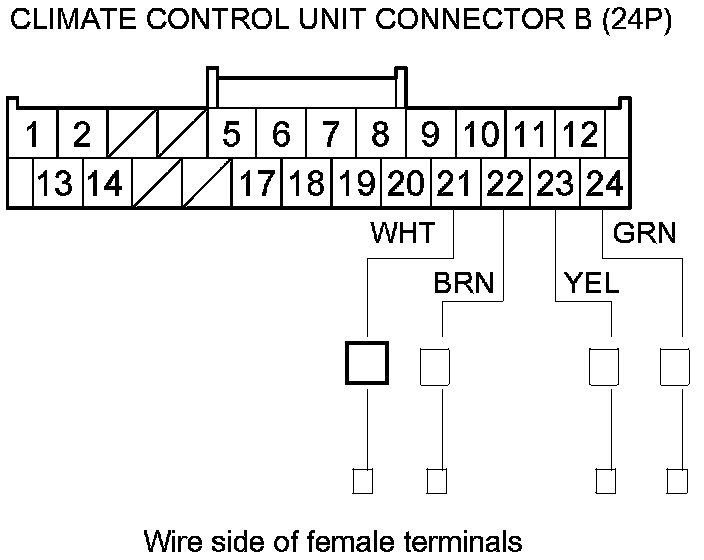
Is there continuity?
YES -
Repair a short to body ground in the wire(s) between the climate control unit and the audio-navigation and HVAC switch panel or the audio and HVAC switch panel.�
NO -
Go to step 36.
36. Reconnect audio-navigation and HVAC switch panel connector B (32P) or audio and HVAC switch panel connector B (32P).
37. Check for continuity between audio-navigation and HVAC switch panel connector B (32P) or audio and HVAC switch panel connector B (32P) terminals and body ground as shown. Do not press the switch or the button.
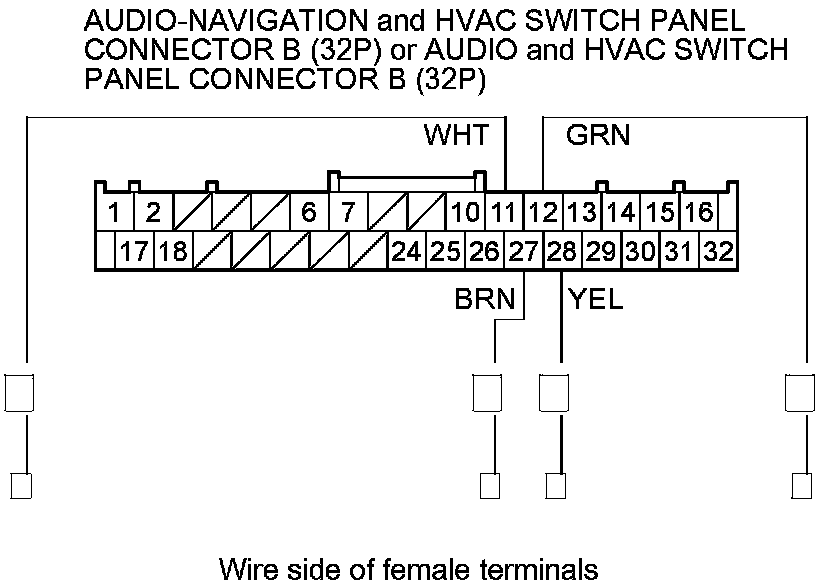
Is there continuity?
YES -
Substitute a known-good audio-navigation and HVAC switch panel or the audio and HVAC switch panel, and recheck. If the symptom goes away, replace the original audio-navigation and HVAC switch panel Audio-Navigation and HVAC Switch Panel Removal/Installation or the audio and HVAC switch panel Audio and HVAC Switch Panel Removal/Installation.�
NO -
Substitute a known-good climate control unit, and recheck. If the symptom/indication goes away, replace the original climate control unit Service and Repair.�
38. Turn the ignition switch to ON (II), or press the engine start/stop button to select the ON mode.
39. Measure the voltage between climate control unit connector B (24P) terminals and body ground as shown.
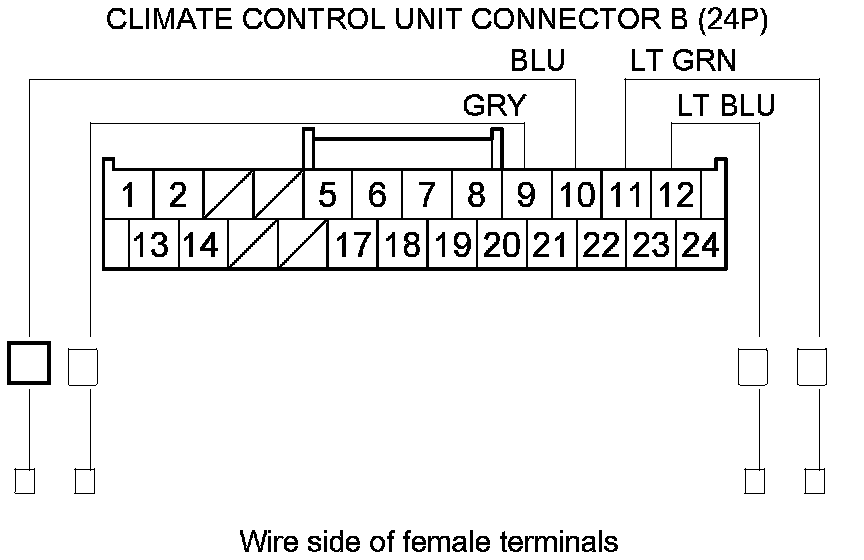
Is there about 5 V?
YES -
Go to step 40.
NO -
Go to step 44.
40. Turn the ignition switch to LOCK (0), or press the engine start/stop button to select the OFF mode.
41. Disconnect audio-navigation and HVAC switch panel connector B (32P) or audio and HVAC switch panel connector B (32P).
42. Turn the ignition switch to ON (II), or press the engine start/stop button to select the ON mode.
43. Measure the voltage between audio-navigation and HVAC switch panel connector B (32P) or audio and HVAC switch panel connector B (32P) terminals and body ground as shown.
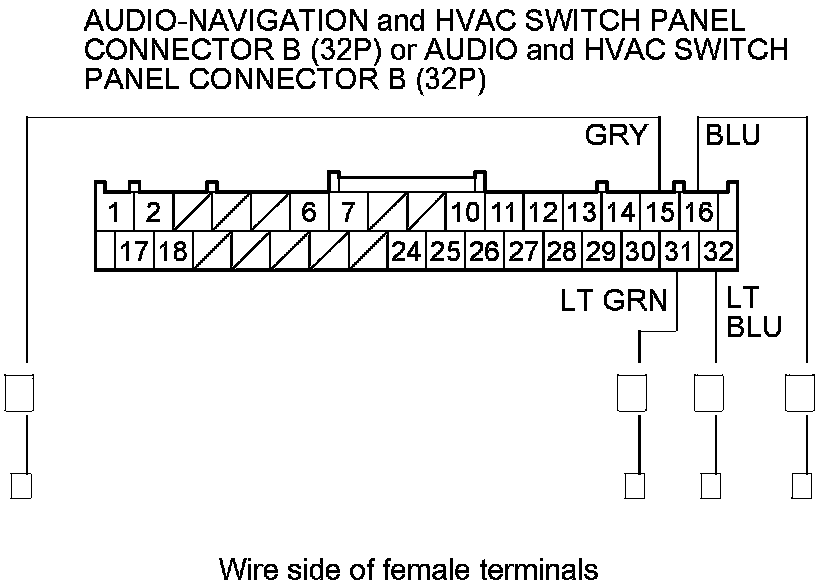
Is there about 5 V?
YES -
Substitute a known-good audio-navigation and HVAC switch panel or the audio and HVAC switch panel, and recheck. If the symptom goes away, replace the original audio-navigation and HVAC switch panel Audio-Navigation and HVAC Switch Panel Removal/Installation or the audio and HVAC switch panel Audio and HVAC Switch Panel Removal/Installation.�
NO -
Repair an open in the wires between the climate control unit and the audio-navigation and HVAC switch panel or the audio and HVAC switch panel.�
44. Turn the ignition switch to LOCK (0), or press the engine start/stop button to select the OFF mode.
45. Disconnect climate control unit connector B (24P) and audio-navigation and HVAC switch panel connector B (32P) or audio and HVAC switch panel connector B (32P).
46. Check for continuity between climate control unit connector B (24P) terminals and body ground as shown.
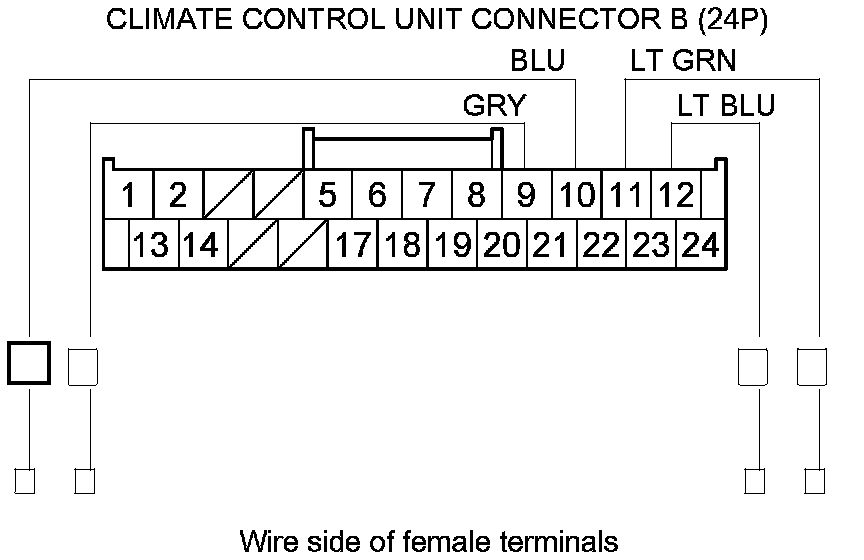
Is there continuity?
YES -
Repair a short to body ground in the wire(s) between the climate control unit and the audio-navigation and HVAC switch panel or the audio and HVAC switch panel.�
NO -
Go to step 47.
47. Reconnect audio-navigation and HVAC switch panel connector B (32P) or audio and HVAC switch panel connector B (32P).
48. Check for continuity between audio-navigation and HVAC switch panel connector B (32P) or audio and HVAC switch panel connector B (32P) terminals and body ground as shown. Do not press the switch or the button.
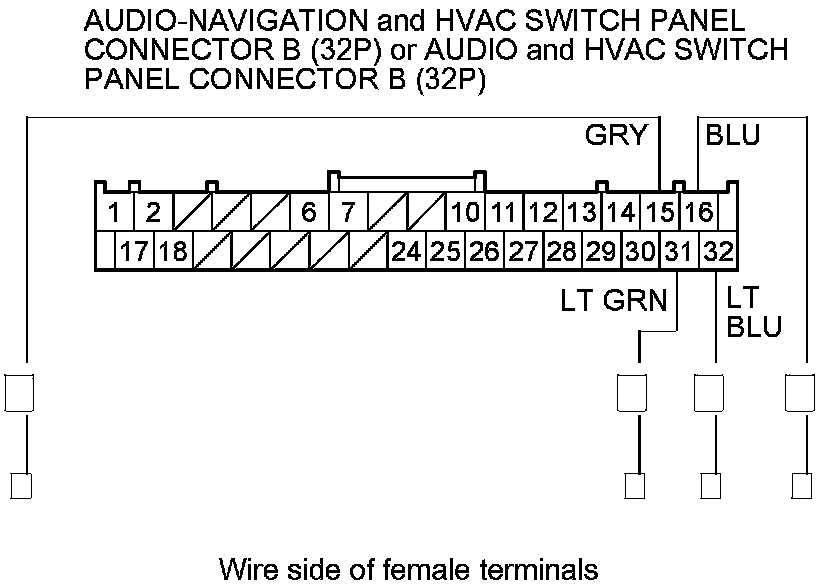
Is there continuity?
YES -
Substitute a known-good audio-navigation and HVAC switch panel or the audio and HVAC switch panel, and recheck. If the symptom goes away, replace the original audio-navigation and HVAC switch panel Audio-Navigation and HVAC Switch Panel Removal/Installation or the audio and HVAC switch panel Audio and HVAC Switch Panel Removal/Installation.�
NO -
Substitute a known-good climate control unit, and recheck. If the symptom/indication goes away, replace the original climate control unit Service and Repair.�