F-CAN Lost Communication With Gauge Control Module
DTC Troubleshooting: U0155
DTC U0155:
F-CAN Lost communication with Gauge Control Module
1. Connect the HDS to the DLC How to Troubleshoot the AcuraLink.
2. Turn the ignition switch to ON (II), or press the engine start/stop button to select the ON mode.
3. Check for DTCs with the HDS and DTC log data in the navigation System Diagnostic Mode use XM (HIP) Diag Navigation System Diagnostic Mode Part One.
Is DTC U0155 indicated with HDS and on the navigation display?
YES -
Go to step 4.
NO -
Intermittent failure, the F-CAN communication line is OK at this time. Check for poor connections or loose terminals at the AcuraLink control unit (XM receiver).�
4. Turn the ignition switch to LOCK (0), or press the engine start/stop button to select the OFF mode.
5. Disconnect AcuraLink control unit (XM receiver) connector A (32P) and the gauge control module connector A (32P).
6. Check for continuity between AcuraLink control unit (XM receiver) connector A (32P) terminals No. 6 and No. 7 and gauge control module connector A (32P) terminals No. 13 and No. 14 respectively.
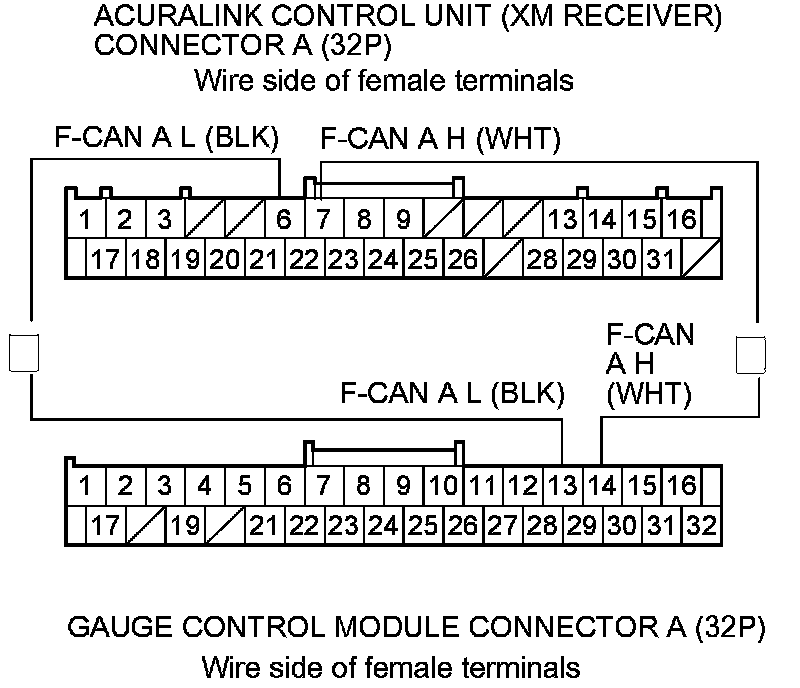
Is there continuity?
YES -
Check for poor connections or loose terminals at the AcuraLink control unit (XM receiver). If all connections are OK, update the AcuraLink control unit Programming and Relearning if it does not have the latest software, then recheck. If the software is the latest, replace the AcuraLink control unit (XM receiver) AcuraLink Control Unit (XM Receiver) Removal/Installation.�
NO -
Repair an open in the wire between the AcuraLink control unit (XM receiver) and the gauge control module.�