B18A7
DTC Troubleshooting: B18A7
DTC B18A7:
Left BSI Radar Unit Voltage Input Low
1. Clear the DTCs with the HDS How To Troubleshoot The Blind Spot Information System (BSI).
2. Press the engine start/stop button to select the ON mode, then wait for 20 seconds.
3. Check for DTCs with the HDS How To Troubleshoot The Blind Spot Information System (BSI).
Is DTC B18A7 indicated?
YES -
Go to step 4.
NO -
Intermittent failure, the system is OK at this time.�
4. Press the engine start/stop button to select the OFF mode.
5. Check the connection at the left BSI radar unit 6P connector.
Is the connection OK?
YES -
Go to step 6.
NO -
Repair the poor connection, and retest.�
6. Disconnect the left BSI radar unit 6P connector.
7. Press the engine start/stop button to select the ON mode.
8. Measure the voltage between left BSI radar unit 6P connector terminals No. 2 and No. 5. There should be battery voltage.
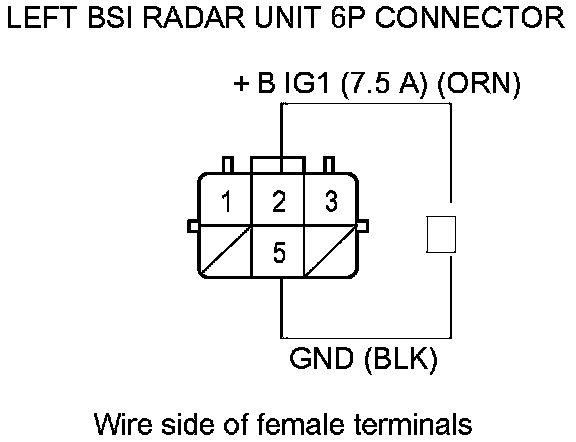
Is there battery voltage?
YES -
Replace the left BSI radar unit BSI Radar Unit Removal/Installation.�
NO -
Go to step 9.
9. Measure the voltage between left BSI radar unit 6P connector terminal No.2 and body ground.
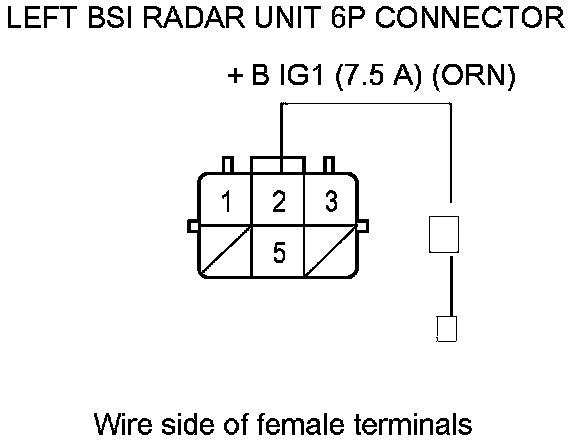
Is there battery voltage?
YES -
Repair an open in the wire between the left BSI radar unit 6P connector and G701 Harness Locations.�
NO -
Repair an open in the wire between the driver's under-dash fuse/relay box and the left BSI radar unit.�