There Is No Sound From the Left Speaker When the USB Device Is Connected
Symptom Troubleshooting: There is no sound from the left speaker when the USB device is connected
There is no sound from the left speaker when the USB device is connected
NOTE:
- Check the vehicle battery condition first. Testing and Inspection
- Check the connectors for poor connections or loose terminals.
1. Turn the ignition switch to ON (II).
2. Check the sound output in AM/FM and CD modes.
Is the sound normal?
YES - Go to step 3.
NO - Go to no sound is heard from the speaker(s). No Sound Is Heard From the Speaker(s) (Display Is Normal)
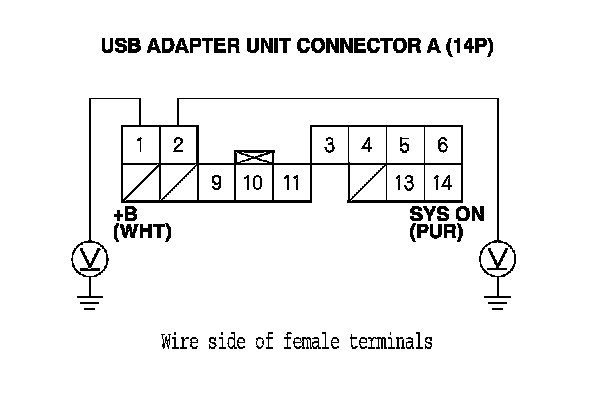
3. Measure the voltage between body ground and USB adapter unit connector A (14P) terminals No. 1 and No. 2 and individually.
Is there battery voltage?
YES - Go to step 4.
NO - Repair an open in the wire(s) between the USB adapter unit and the audio unit.
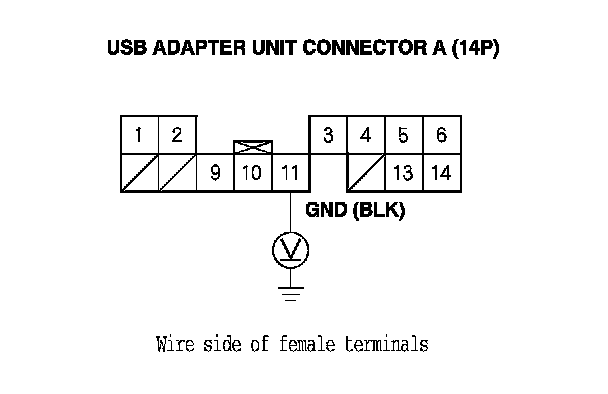
4. Measure the voltage between USB adapter unit connector A (14P) terminal No. 11 and body ground.
Is there less than 0.2 V?
YES - Go to step 5.
NO - Repair an open in the wire(s) between the USB adapter unit and the audio unit.
5. Turn the ignition switch to LOCK (0).
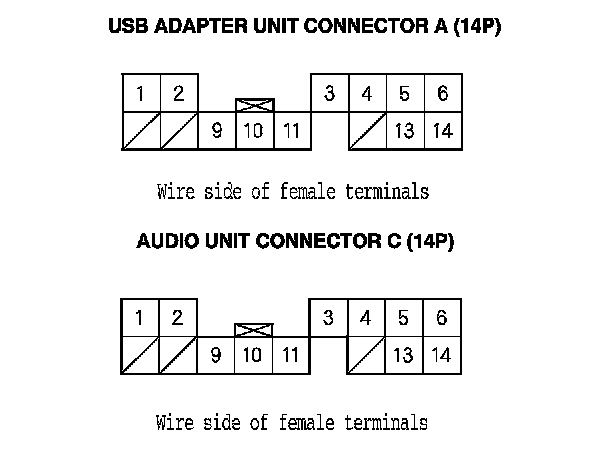
6. Disconnect USB adapter unit connector A (14P) and audio unit connector C (14P).
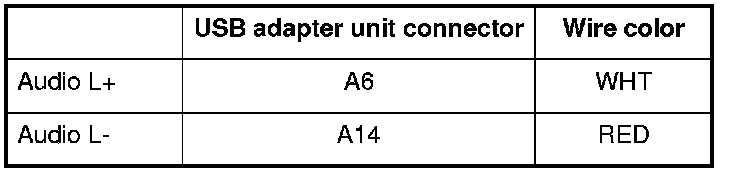
7. Check for continuity between terminals of USB adapter unit connector A (14P) and body ground according to the table. Then check for continuity between the same terminals listed in the table and USB adapter unit connector A (14P) terminal No. 4 (The harness shield).
Is there continuity?
YES - There is a short in the wire(s) between the USB adapter unit and the audio unit. Replace the affected shielded harness.
NO - Go to step 8.
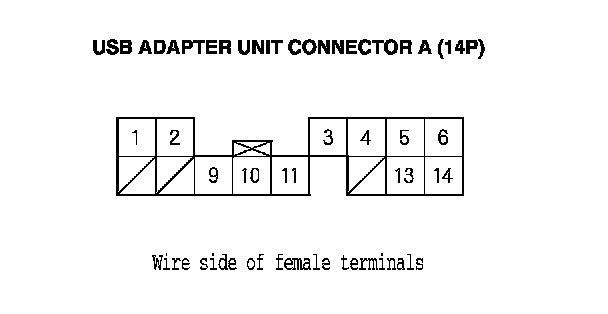
8. Check for continuity between USB adapter unit connector A (14P) and audio unit connector C (14P) according to the table.

Is there continuity?
YES - Replace the USB adapter unit. USB Adapter Unit Replacement
NO - There is an open in the wire(s) between the USB adapter unit and the audio unit. Replace the affected shielded harness.