Driver's Dashboard Undercover Removal/Installation
Driver's Dashboard Undercover Removal/Installation
Special Tools Required
- KTC trim tool set SOJATP2014*
*Available through the Acura Tool and Equipment Program.
NOTE:
- Use the appropriate tool from the KTC trim tool set to avoid damage when removing components.
- Take care not to scratch the dashboard and its related parts.
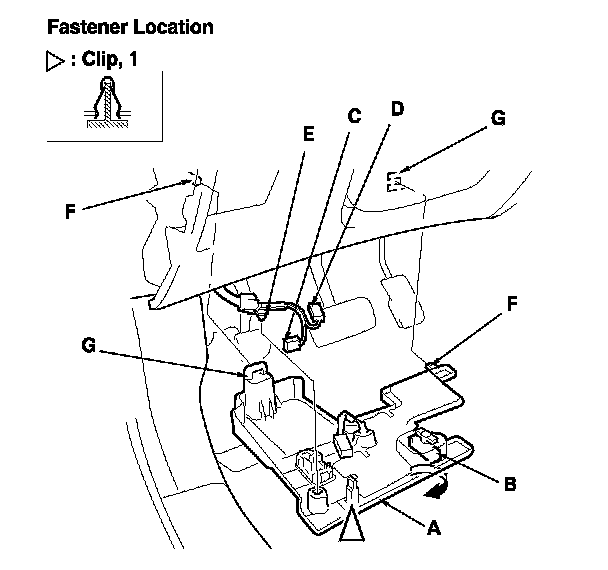
1. Remove the driver's dashboard undercover (A).
-1 Turn the lock knob (B) 90 °.
-2 Gently pull down the rear edge to detach the clip.
-3 Disconnect the footwell light connector (C) and ambient light connector (D), then detach the harness clip (E).
-4 Pull the undercover away to release the pins (F) from the holders (G).
2. Install the undercover in the reverse order of removal, and note these items:
- Replace the clip if it's damaged.
- Push the clip into place securely.
- Make sure that each connector is plugged in properly.
- Make sure the pins on of the cover are securely seated.