Radio Preset Memory Is Lost
Symptom Troubleshooting: Radio preset memory is lost
Radio preset memory is lost
NOTE:
- If only XM stations are lost, go to XM radio preset memory is lost (with AcuraLink) Symptom Troubleshooting or XM radio preset memory is lost (without AcuraLink). Symptom Troubleshooting
- Check the vehicle battery condition first.
1. Turn the ignition switch to ON (II).
2. Turn on the audio unit, and set each of the radio station preset buttons.
Do each of the preset buttons set properly?
YES - Go to step 3.
NO - Go to step 5.
3. Turn the ignition switch to LOCK (0) for 1 minute, then turn it back to ON (II).
4. Test all the preset buttons for proper recall operation.
Do the preset buttons recall the set radio stations?
YES - Intermittent failure, the system is normal at this time. Check connections at the audio unit.
NO - Go to step 5.
5. Inspect No. 5 (10 A) fuse in the under-dash fuse/relay box.
Is it OK?
YES - Go to step 6.
NO - Replace the fuse and reset. If it fails again, repair the short to ground in the harness.
6. Remove the audio unit. Audio Unit Removal/Installation
7. Turn the ignition switch to ON (II).
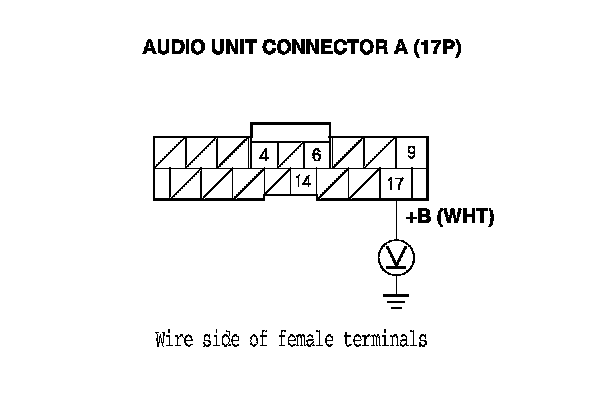
8. Measure the voltage between the audio unit connector A (17P) terminal No. 17 and body ground.
Is there battery voltage?
YES - Go to step 9.
NO - An open wire between the under-dash fuse/relay box and audio unit A17 terminal.
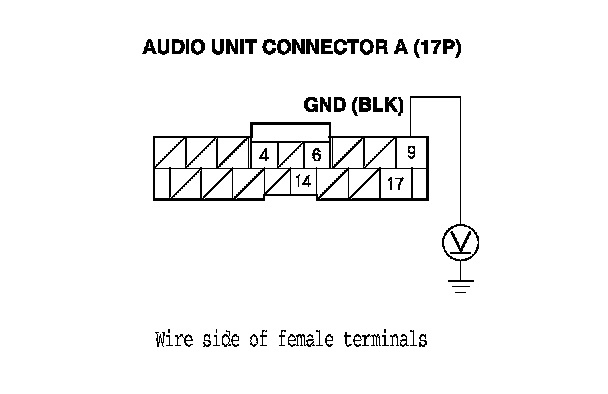
9. Measure the voltage between the audio unit connector A (17P) terminal No. 9 and body ground.
Is there less than 0.1 V?
YES - Replace the audio unit. Audio Unit Removal/Installation
NO - An open wire between the audio unit connector A (17P) terminal No. 9 and body ground (G504).