Audio Unit Power Switch Will Not Turn Off
Symptom Troubleshooting: Audio unit power switch will not turn off
Audio unit power switch will not turn off
NOTE:
- Check for aftermarket accessories plugged into the vehicle accessory power sockets.
- Check the connectors for poor connections or loose terminals.
- Check the vehicle battery condition first.
1. Turn the ignition switch to ON (II).
2. With the ignition switch in ON (II), push the power switch OFF or turn the ignition switch to LOCK (0) to see if the audio unit turns OFF.
Does the audio unit turn OFF?
YES - Operation is normal.
NO - Go to step 3.
3. Turn the ignition switch to LOCK (0).
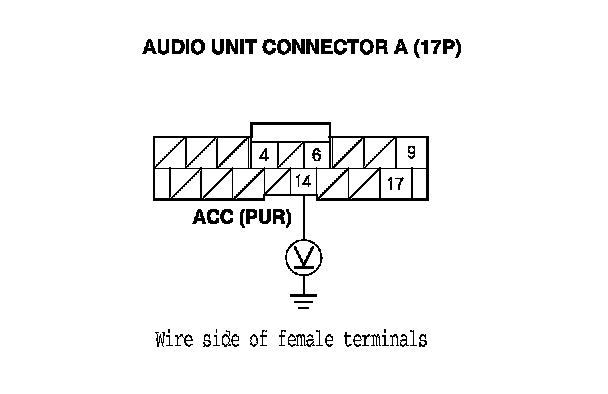
4. Remove the audio unit. Audio Unit Removal/Installation Disconnect the audio unit connector A (17P).
NOTE: Eject all the CDs before disconnecting the audio unit and CD changer to prevent damaging the CD player's load mechanism.
5. Measure the voltage between the terminal No. 14 of audio unit connector A (17P) and body ground.
Is there battery voltage?
YES - Check for short to power on the PUR wire.
NO - Audio unit is faulty, replace the audio unit. Audio Unit Removal/Installation